
Why your email list is not converting, and what to fix first
A big list sending regular campaigns and almost no revenue. Nine times out of ten the problem is not the copy, and it is not the design.
Forty thousand subscribers. A campaign every week, decent design, products people buy from the site. And email revenue that would embarrass a store a tenth the size.
The instinct is to rewrite the subject lines. Almost always the problem is earlier than that, and the order you investigate in determines whether you find it.
Fix it in this order
| Symptom | Likely cause | Fix |
|---|---|---|
| High reported opens, almost no clicks | Apple Mail Privacy Protection inflating opens, or promotions-tab placement | Judge on clicks; check placement by mailbox provider |
| Gmail engages, Outlook does not | Inbox placement problem at one provider | Authentication, domain reputation, re-warm |
| Bounce rate above 2% | Unverified or purchased contacts | Suppress, verify sign-up sources, double opt-in on pop-ups |
| Complaint rate above 0.1% | Sending to people who do not remember subscribing | Sunset the inactive, cut frequency to cold segments |
| Decent clicks, no revenue | Wrong offer or wrong audience, not a delivery issue | Segment by behaviour and match the offer |
| Flow revenue near zero | The flows are not built, or are one email each | Build the core flow set |
Work top to bottom. A beautiful campaign to a list that is half in the spam folder earns nothing, and you cannot tell the difference from the dashboard.
Deliverability first: are you in the inbox at all?
Delivered is not the same as delivered to the inbox. Your platform reports what the receiving server accepted, which includes everything it accepted and then filed in spam.
Check these in order:
- Authentication. SPF, DKIM and a published DMARC record, all on a branded sending subdomain rather than the shared one your platform gave you. DMARC can start at
p=nonewhile you watch the reports, but the record needs to exist. - Sending domain and warm-up. A new domain sending to forty thousand people on day one gets filtered. Ramp over two to four weeks, starting with your most engaged subscribers, because early engagement is what builds the reputation.
- Placement by provider. Split your click rate by Gmail, Outlook, Yahoo and Apple Mail. Providers differ, but a provider where clicks collapse to near zero is a placement signal, not a taste signal.
- Complaints and bounces. Under 0.1% and under 2% respectively. Above those, stop sending campaigns and fix the list before anything else.
- Links and images. Click-tracking on a branded domain, not a shared tracking domain other senders have burned. Hosted images on your own domain. One unsubscribe link that works in one click.
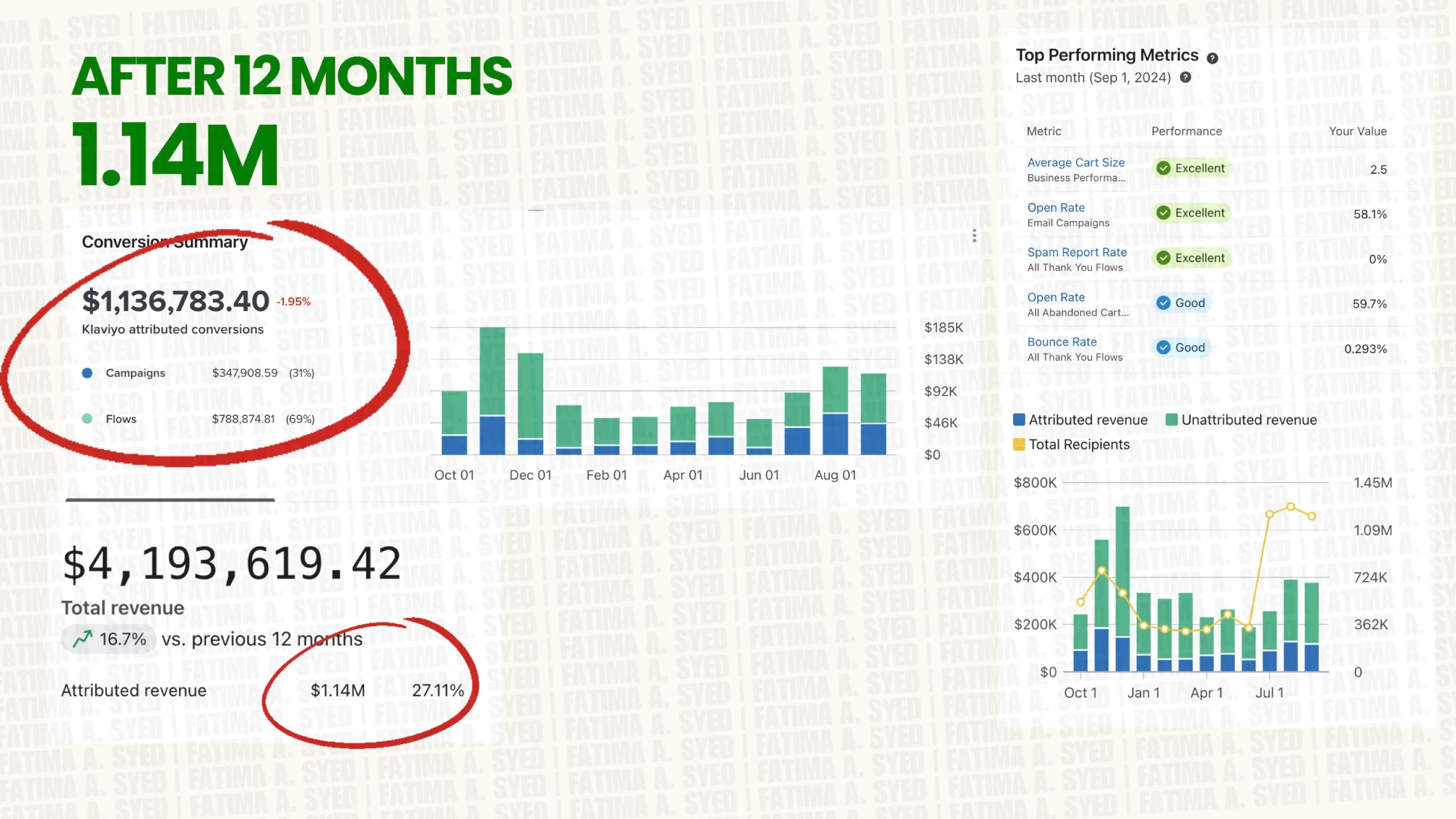
This is unglamorous and it is the whole ballgame. The luxury clothing brand we run email for held a 0% spam complaint rate across a year of sending, and that is not luck, it is the reason the campaigns were able to earn anything at all.
Sunsetting dead contacts, which nobody wants to do
Mailbox providers judge your domain on how the people you send to behave in aggregate. Twelve thousand subscribers who have not opened anything in two years are not neutral. They are actively lowering the odds that your buyers see the next send.
A sunset policy that works:
- Re-engagement attempt first. Three emails over ten days to anyone with no open or click in 180 days. Be direct: “still want these?”, one button to stay, one to leave. Do not dress it up.
- Then suppress. No open or click in 180 days and no order in 365 days, after the re-engagement attempt, moves to a suppressed segment.
- Keep the record, stop the sending. You are not deleting the customer history, you are excluding them from campaigns.
- Make it a rule, not an event. Run it monthly, automatically, so it never becomes a decision somebody has to defend.
Your list size will fall and your revenue will not. We have done this on lists where a third of the contacts went into suppression and campaign revenue went up the following month, because the emails started arriving.
Segment by behaviour, not demographics
Most lists are segmented by nothing, and the ones that are segmented are usually split by gender or location, which predicts very little about whether somebody buys this week.
Behaviour predicts it. The segments worth building:
- Engaged 30 / 60 / 90 days. Opened or clicked in the window. This is your campaign audience, and it is how you protect placement.
- Buyers by recency. Ordered in 30 days, 31–90, 91–180, 180+. Different messages entirely.
- One-time versus repeat. The single most useful split in e-commerce, because the job of each email is different.
- Category or collection viewed. Somebody who looked at outerwear three times should not be getting the swimwear campaign.
- Price band. Your £400 customers and your £40 customers do not want the same email, and sending the clearance email to the first group costs you.
- Never purchased, still engaged. A real audience with a specific objection, usually price or sizing.
Then actually send differently to them. Segmentation that exists in the platform but not in the send schedule is a tidy account, not a strategy. On the luxury brand, segmenting by purchase history and engagement is what kept open rates above 58%, which in turn kept the domain out of the spam folder.
Send frequency and offer relevance
Frequency is a trade. More sends usually means more total revenue for a few months and lower revenue per recipient, rising complaints and a list that gradually stops responding. Judge it on revenue per recipient and complaint rate together, never on total revenue alone.
Our default for a store: one to two campaigns a week to the engaged segment, once a month or less to the unengaged, and a hard rule that nobody receives a campaign and a flow email within 24 hours. Then there is the offer. If your campaigns are a weekly 15% code, you have trained the list to wait, and the only people reading are the ones who will not pay full price. Mix announcement, education, proof and offer, and give the list a reason to open that is not a discount.
Worth saying plainly: if flows are not built, no amount of campaign tuning fixes this, because flows should be producing most of your email revenue. Which ones, and in what order, is the Klaviyo flows that matter, and the highest-value one is covered in the abandoned cart flow.
Open rate theatre versus revenue per recipient
Apple Mail Privacy Protection pre-loads images on behalf of the recipient, which registers an open nobody made. A 60% open rate on an Apple-heavy list may mean very little, and it moves when your audience mix moves.
Judge a campaign on:
- Revenue per recipient. The number that compares one send to another fairly, regardless of list size.
- Click rate, and specifically clicks to product and collection pages rather than to the footer.
- Conversion rate of clickers. If this is low, the problem is the landing page, not the email.
- Unsubscribe rate, as the cost of the send.
- Spam complaint rate, as the cost to every future send.
- Flow share of email revenue, as the health of the whole programme.
Use open rate for one thing only: spotting a sudden drop at a single provider, which is an early placement warning. And if your platform’s revenue number and your store’s number disagree, that is an attribution question rather than an email one, which we cover in why GA4 shows the wrong numbers.
What this looks like when we do it
HydroHealth had pre-purchase flows that underperformed and no post-purchase flows at all. We rebuilt the former, built the latter from nothing, and set up segmentation so each flow adapts to first-time and returning customers. The new system beat the old one by more than 2×, total store revenue rose 16%, and the programme returned 63× in 60 days. We measured it against total store revenue rather than the platform’s own attribution, which is the harder number and the honest one. On the longer view, the luxury clothing brand’s $1.14M year was built on the same two things: segmentation and deliverability, before any copy was written.
What to check this week
Pull three numbers: your complaint rate, your click rate split by mailbox provider, and the percentage of your list that has not opened anything in 180 days. Those three tell you whether you have a delivery problem, a list problem or a content problem, and they take about twenty minutes to find.
If it is the first two, you now know what to do and the order to do it in. If you would rather hand it over, this is our email and SMS work, and a free audit includes a strategist reviewing your account before the call, with a one-page plan you keep either way.
Common questions
Why is my email list not converting?
In the accounts we audit the usual order is: a share of sends never reaching the inbox, a list carrying thousands of never-openers that drags placement down, campaigns sent to everyone instead of segments, and only then the offer or the copy. Diagnose in that order, because fixing the last one first changes nothing.
How do I know if my emails are going to spam?
Compare click rate between mailbox providers in your platform's analytics. If Gmail recipients click at a normal rate and Outlook recipients barely click at all, that is a placement problem, not a content problem. Also check your bounce rate, your complaint rate and whether you have a DMARC record.
Should I delete inactive email subscribers?
Suppress them, yes. A standard sunset rule is: no open or click in 180 days and no order in 365 days, after one three-email re-engagement attempt. Mailbox providers score your domain on aggregate engagement, so keeping dead contacts to protect a list size number costs you delivery to the people who do buy.
How often should I send marketing emails?
For most e-commerce brands, one to two campaigns a week to engaged segments and far less to the rest. Judge frequency on revenue per recipient and complaint rate rather than total revenue, because total revenue rises for a while on volume alone and then the list stops responding.
Is open rate still a useful metric?
Only as a trend, and only within one mailbox provider. Apple Mail Privacy Protection pre-loads images, which registers opens the recipient never made, so the absolute number is inflated and varies with your audience mix. Click rate and revenue per recipient are what to judge a campaign on.
Proof from our work
Email-attributed revenue in 12 months, 27% of store revenue
For a luxury clothing brand we built Klaviyo into a revenue channel: $1.14M attributed to email in twelve months, 27% of the store's $4.19M total. Automated flows produced 69% of it, campaign open rates stayed above 58% and the spam complaint rate was zero.
Read case study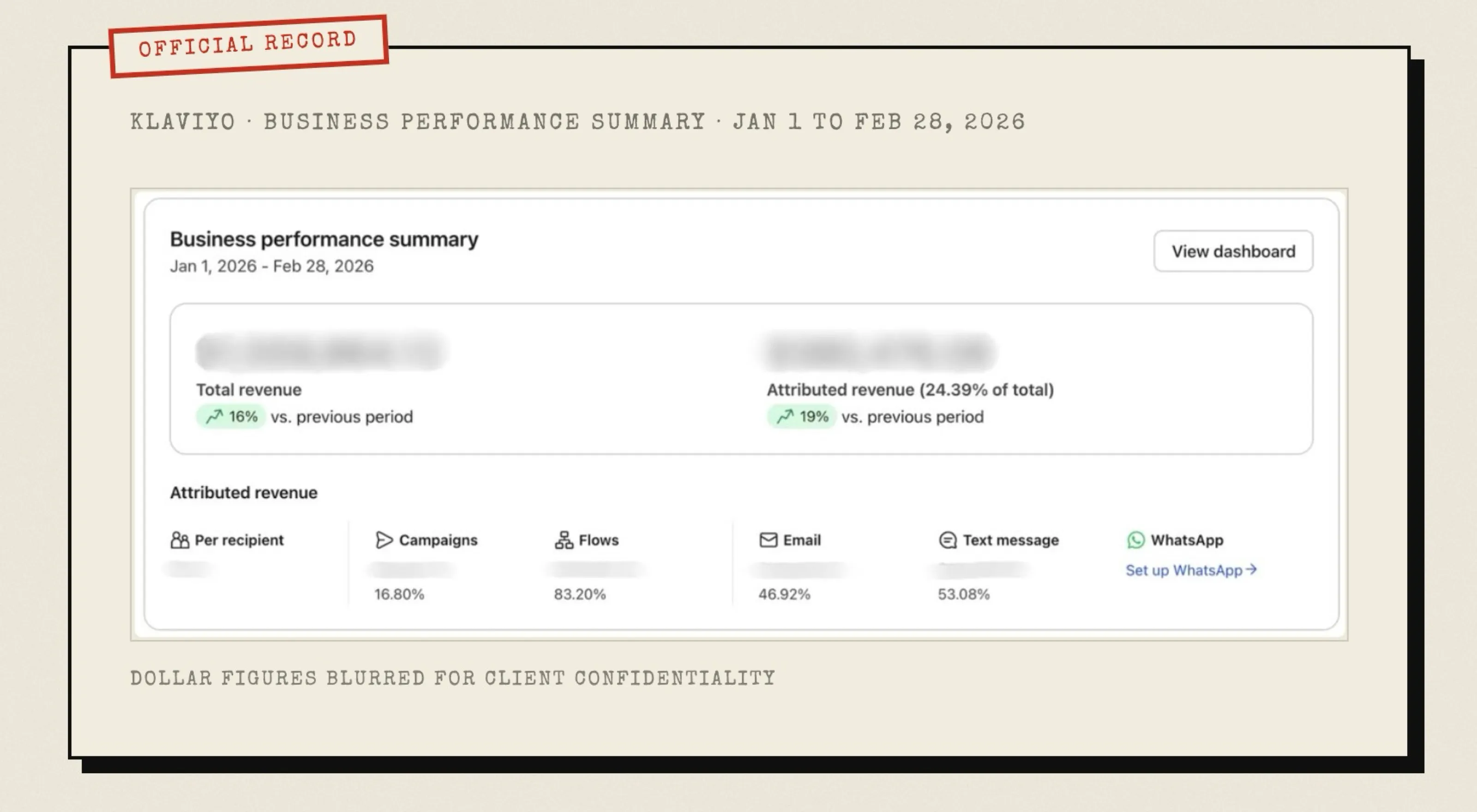
In the first 60 days, measured on total store revenue
HydroHealth had pre-purchase flows that underperformed and no post-purchase flows at all. We rebuilt the former and built the latter from nothing, covering strategy, copy, design and build in Klaviyo. The new system beat the old one by more than 2×, total revenue rose 16% and the programme returned 63× in 60 days.
Read case study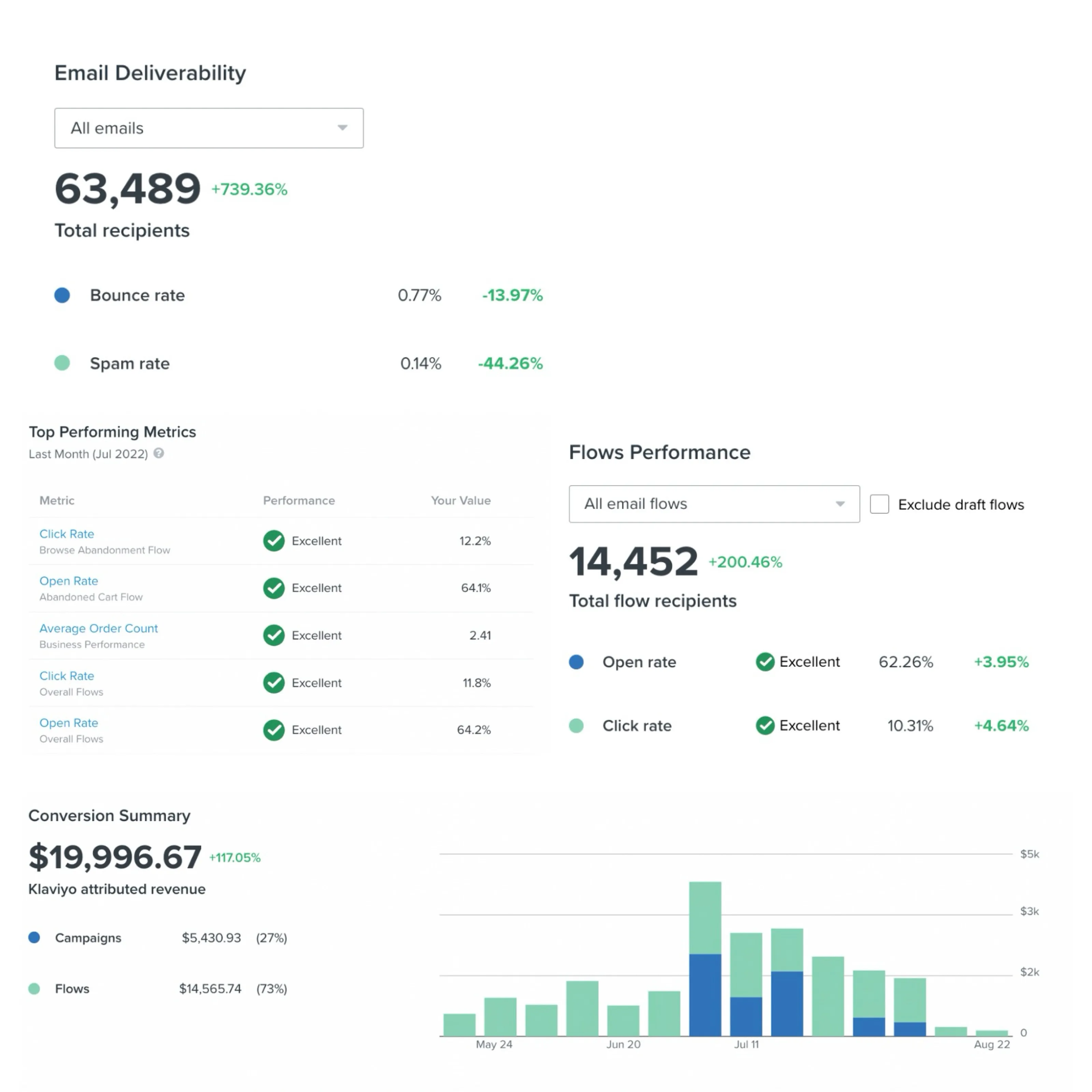
Email revenue for a UK vitamins and supplements brand
Rock & Roses sells vitamins and supplements in the UK. We took over Klaviyo campaigns and flows, designed product-led emails with customer reviews, and cleaned up deliverability. Email revenue rose 30%, the spam rate fell to 0.14% and flow emails reach a 62% open rate.
Read case study