
Six n8n automations worth building first
Everyone agrees automation saves time. Far fewer people can name the specific workflow they would build on Monday morning. Here are six, with their triggers and steps.
Everyone agrees that automation saves time. Far fewer people can name the exact workflow they would build on Monday morning, which is why most automation projects stall at the enthusiasm stage.
So here are six we build repeatedly, each with its trigger, its steps and the manual work it removes. Pick the one that happens most often in your week. Not the one that annoys you most: the one with the highest repetition count, because that is where the hours are.
1. Invoice to appointment, end to end
Trigger: an intake or booking form submission hits a webhook.
Steps: create the client record; generate a PDF invoice from a template; email it from Gmail; watch the inbox for the payment confirmation; on payment, create the calendar appointment with a meeting link and send it; sync the record to Notion and Google Sheets; alert a human on any failed branch.
What it replaces: the chain of copy-paste that follows every new client. Count the minutes you spend per client on invoice, inbox-watching, booking and updating two spreadsheets, then multiply by new clients per month. For a clinic running several a day, that is most of an admin role.
The slowest step is usually the one nobody thinks of as work: checking whether the money arrived. Automating the payment detection is what unlocks the rest of the chain, because every later step depends on it.
2. Proposal generation from a short form
Trigger: a sales rep submits a five-field form after the call.
Steps: an AI step maps the notes onto your proposal structure and writes the personalised sections; a copy of the master deck is created in Google Drive; the placeholders are replaced in Google Slides; Gmail sends it from the rep’s own account so the thread stays with them; the inputs are logged to a sheet.
What it replaces: an hour or more of deck building per proposal, and the two days of cooling-off while the client waits. If your team sends five proposals a week, that is most of a working day back, every week.
Two details make it work. The trigger is a form the rep already fills in, so nobody has to adopt a new habit. And the AI writes into a fixed template rather than generating a document from scratch, which keeps everything on-brand.
3. Lead scraping and enrichment
Trigger: manual run with parameters (business type, location) or a weekly schedule.
Steps: search a source such as Google Maps for matching listings; loop over the results; visit each website; extract emails and any other contact detail; de-duplicate against your CRM; filter out the irrelevant entries; write a clean list to Google Sheets ready for outreach.
What it replaces: days of a junior researcher tabbing between search results and contact pages. A list that took two days to assemble by hand lands in minutes.
Be honest about the limits. Scraped lists are raw material, not a campaign, and they go stale. Respect the terms of the sources you pull from and your market’s marketing rules before you send anything.
4. Competitor price monitoring
Trigger: a daily schedule, or on demand before a pricing meeting.
Steps: read your product and competitor URL list from a sheet; fetch each page; convert the HTML to Markdown; ask an AI step to extract the current price; write it back to the sheet with the date so you build a history.
What it replaces: whoever currently opens 40 tabs every Monday, or more likely the fact that nobody does and your pricing decisions are based on a snapshot from last quarter.
The AI extraction step is what makes this maintainable. Hard-coded CSS selectors break every time a competitor redesigns; asking a model to find the price in the page text survives most layout changes.
5. Review requests and drafted replies
Trigger: a job marked complete in the CRM (for the request), and a scheduled check of your Google Business Profile (for the replies).
Steps: send the review request by WhatsApp or SMS a set number of hours after the job; separately, fetch new reviews; store them with their status in Airtable; have an AI agent draft an on-brand reply following your written guidelines; send the draft to a manager who can publish, edit then publish, or skip; post the approved reply and update the record.
What it replaces: review chasing that never happens consistently, and reply writing that takes minutes per review and sounds different depending on who did it.
Note the human in the loop. Public replies are one of the few places where we always keep approval, because the cost of one bad automated reply is higher than the time it saves. If local visibility is the goal behind this, the automation only matters alongside the rest of the local SEO fundamentals.
6. Reporting digests
Trigger: a schedule, usually Monday 7am and the first of the month.
Steps: pull the numbers from ad platforms, analytics and the CRM; normalise them into one row per channel; compare against the previous period; have an AI step write three sentences on what changed and what looks wrong; post to Slack or email, with a link to the full dashboard.
What it replaces: the half-day someone spends assembling a report nobody reads, and the fortnight it takes to notice that a campaign broke.
Keep the digest short. Five numbers and the exceptions. The purpose is to get people to look, not to be comprehensive.
When n8n is the right tool, and when it is not
| Situation | Use | Why |
|---|---|---|
| Everything happens inside one platform | Native workflows (GoHighLevel, HubSpot, Shopify Flow) | No credentials to manage, your team can edit it, nothing to host |
| Two tools, one trigger, no branching | Zapier or Make | Faster to build, easier for a non-technical owner |
| Three or more systems, branching logic, loops | n8n | Real control flow, code steps where you need them, no per-task cost cliff |
| An AI step in the middle of the process | n8n | Prompt, model and output handling all live in the workflow |
| High volume or sensitive data | Self-hosted n8n | Predictable cost, data stays on your infrastructure |
| A process nobody has written down yet | Neither | Document it first, then automate it |
That last row is the one we enforce. Automating an undocumented process just makes the confusion faster. If a process lives only in one person’s head, write it out as a numbered list first, and expect to find two or three steps that exist for no reason any more.
Native workflows are genuinely better inside their own walls. If your follow-up, reminders and pipeline all live in one CRM, build there and keep n8n for the things it cannot reach, which is roughly the dividing line we draw in GoHighLevel against HubSpot too.
The maintenance cost nobody mentions
Workflows are not furniture. They are small pieces of software, and they rot:
- Credentials expire. OAuth tokens, API keys, app passwords. Put renewal dates in a calendar.
- APIs change. A field gets renamed and your mapping silently writes nulls.
- Scrapers break. Any workflow that reads a page you do not control will need attention a few times a year.
- Volume changes. Something built for 20 records a day behaves differently at 2,000, especially inside loops.
- Models change. Prompts that worked on one model version need re-testing on the next.
So three things are part of the build, not extras. Every branch gets error handling that alerts a person instead of failing quietly. Every run gets logged somewhere you can read it, with the input that caused the failure. And every workflow gets an owner by name. Across a stack of six to ten workflows, expect a few hours a month of upkeep. That is cheap against the hours saved, but it is not zero, and anyone who tells you it is has not maintained one for a year.
What this looks like when we do it
The clinic case is the clearest. Staff were touching four tools per patient: copy the intake form, create an invoice, watch the inbox for payment, book the appointment, update two spreadsheets. We built the whole chain in n8n with error handling and human approval where it mattered, and admin time fell by 90% with zero manual data entry: the write-up is the clinic invoice-to-appointment automation. On the sales side, our n8n AI proposal generator turns post-call form notes into a personalised Slides proposal sent within seconds of the call ending, and the Google Maps lead scraper builds filtered, de-duplicated prospect lists for any niche and city.
Where to start
Take your week and find the task you do more than ten times. Write down its trigger, its steps, and what should happen when a step fails. If it stays inside one platform, build it there this afternoon. If it crosses three, and especially if a human is currently reading something and deciding what to type next, that is an n8n automation worth building, and the ones with a judgement step in the middle are where AI agents earn their place.
If you would rather have someone map the process with you and tell you which two workflows pay back fastest, that is the free audit: 30 minutes, and you keep the action plan whether you hire us or not.
Common questions
What can you automate with n8n?
Anything that crosses tools on a predictable trigger: form submissions into records and invoices, post-call notes into proposals, scheduled scraping into spreadsheets, inbox events into CRM updates, reviews into drafted replies, and daily or weekly reporting digests. n8n is strongest when a process touches three or more systems and needs branching logic or an AI step in the middle.
Is n8n better than Zapier or Make?
For complex or high-volume workflows and anything agentic, yes, because you get real branching, code steps, self-hosting and no per-task pricing surprise. For connecting two tools with one simple trigger, Zapier or Make is faster to build and easier for a non-technical team to own. We recommend after seeing the process.
How much time does automating admin actually save?
Multiply the minutes the task takes by how often it happens, then halve your answer to allow for the exceptions a workflow will still hand back to a person. A clinic we automated intake, invoicing, payment detection and scheduling for cut admin time by 90% and removed manual data entry completely.
What does it cost to maintain n8n automations?
Budget for a few hours a month across a stack of workflows: credential renewals, API changes, scrapers adapting to redesigned pages, and reviewing the error log. Scheduled scraping needs the most attention and internal-API workflows the least. Someone has to own it, or the first silent failure becomes permanent.
Proof from our work
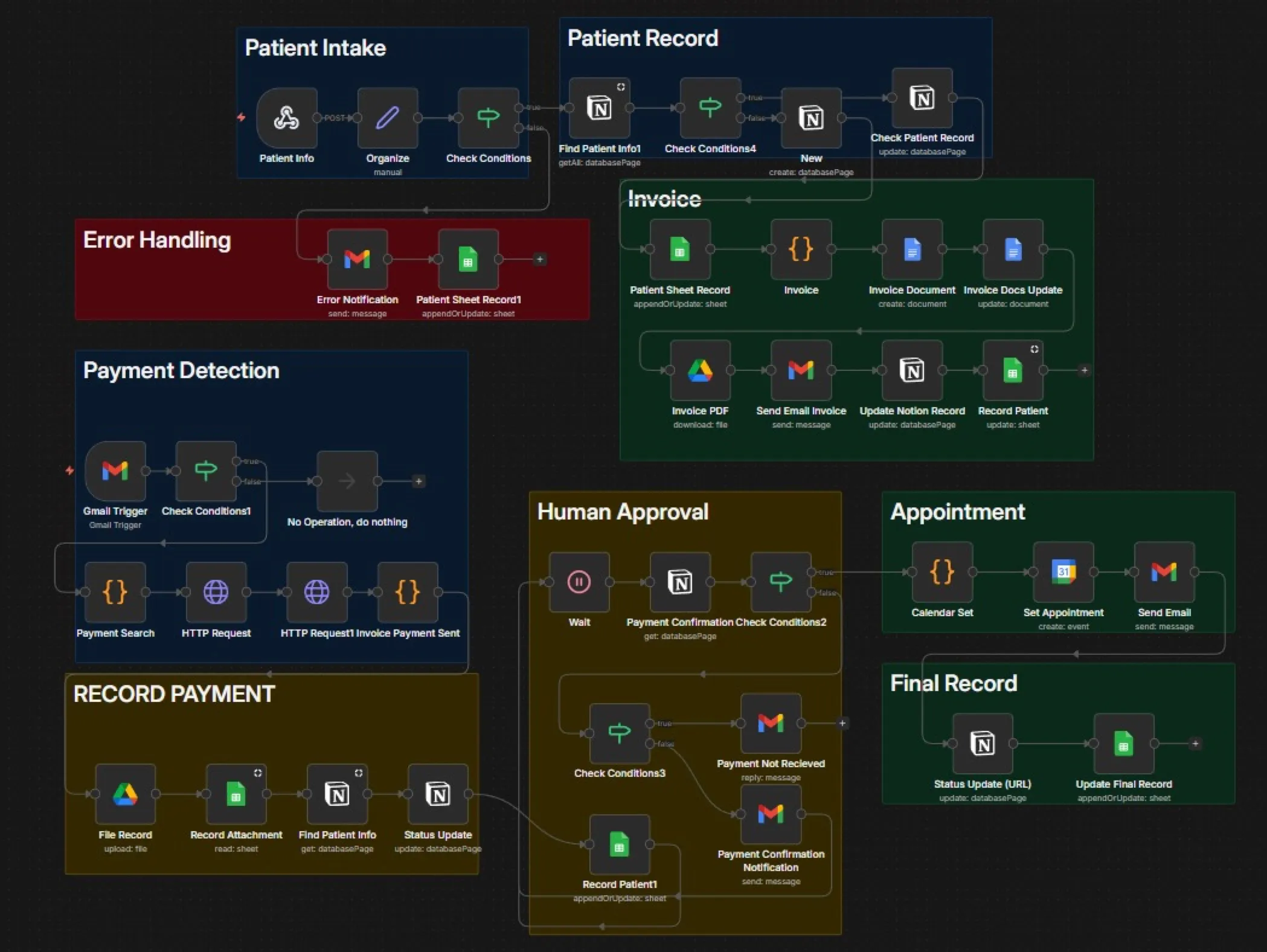
Admin time per patient, with zero manual data entry
A medical clinic handled intake, invoicing, payment tracking and scheduling by hand, with staff switching between four tools per patient. We built an end-to-end n8n automation from intake form to PDF invoice, payment detection in Gmail, calendar booking with a Meet link and live sync to Notion and Sheets. Admin fell by 90%.
Read case study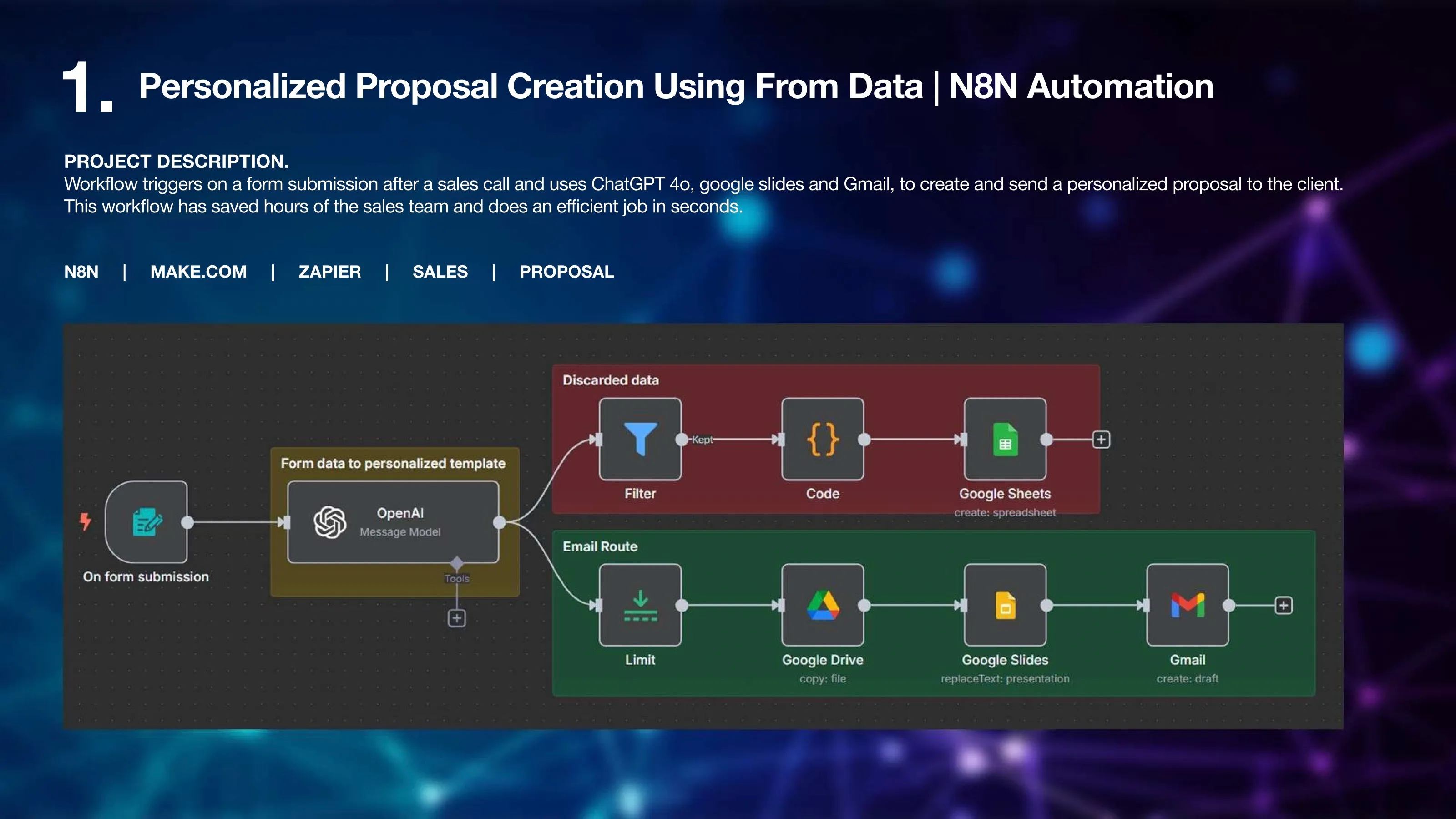
To send a personalised proposal, down from hours
An n8n workflow that triggers on a post-call form submission, uses GPT-4o to turn the notes into a personalised proposal in Google Slides and sends it through Gmail. Hours of sales-team work now happen in seconds.
Read case study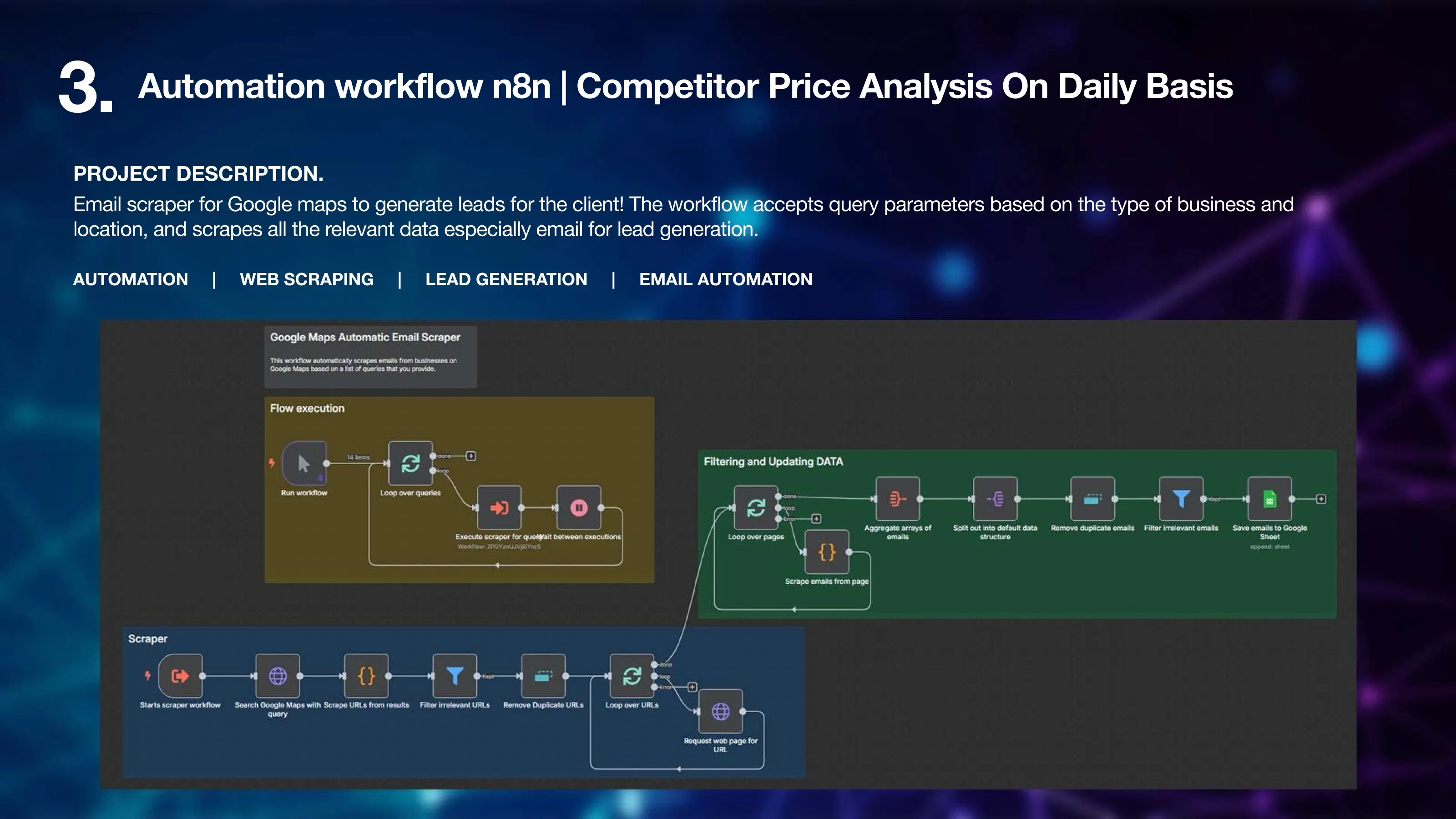
n8n: Google Maps email scraper for lead generation
- Accepts query parameters: business type and location
- Searches Google Maps and loops over results, scraping each listing's website
- Extracts emails, removes duplicates and filters irrelevant entries