
Cut your no-show rate with four messages
An empty chair you have already paid to fill is the most expensive thing in a clinic diary. Most no-shows are a reminder problem, not a commitment problem.
A patient books on Tuesday for a Friday slot. On Friday the chair is empty, nobody rang, and at two hours notice there is no realistic way to fill it. Somewhere in a spreadsheet there is a list of people who would have taken that slot, and nobody has time to call them.
That empty slot is the most expensive thing in your diary, because you have already paid to acquire it. Most of the time it is not a commitment problem. It is a reminder problem, a rescheduling problem, and occasionally a qualification problem.
Work out your real no-show rate before you change anything
Export the last 90 days of appointments and build four columns: attended, late cancellation (inside 24 hours), early cancellation, no-show. Your no-show rate is no-shows divided by total booked appointments in that period. Keep late cancellations separate, because a good reminder sequence converts no-shows into late cancellations first and into rescheduled appointments second. If you lump them together you will think nothing is working.
Then segment, because an average rate hides the fix:
- By booking source. Paid leads, referrals, returning patients and walk-ins behave differently.
- By lead time. Appointments booked 10 days out miss far more often than ones booked tomorrow.
- By appointment type. First consultations against follow-ups, free against paid.
- By day and time. Monday mornings and the slot after lunch are usually the worst in a clinic diary.
- By value. A missed 90-minute slot is not the same problem as a missed 15-minute one.
Two segments usually account for most of the loss. Fix those and ignore the rest for now.
The reminder sequence that actually works
Four messages, all automated, all on the channel the person booked through.
| Message | When | Job | Must contain |
|---|---|---|---|
| Confirmation | Within 60 seconds of booking | Prove it is real and set the policy | Date, time, address with a map link, practitioner name, what to bring, cancellation policy in one line |
| Advance nudge | 3 days before (only if booked over a week ahead) | Catch diary clashes early, while the slot is still fillable | “Still good for Friday?” plus confirm and reschedule buttons |
| Day-before reminder | 24 hours before, mid-morning | The main one. Get a confirm or a reschedule | Confirm button, reschedule button, cancel button, travel or parking note |
| Final reminder | 2 hours before | Beat forgetfulness and traffic | Time, address, how long to allow, direct number |
| Miss follow-up | 30 minutes after the missed slot | Rebook while it is still on their mind | No guilt, two concrete alternative slots, one-tap booking |
Two rules matter more than the timings. First, no message should ever require the person to open a portal, remember a password or ring during opening hours. Second, the 24-hour reminder should be the one you optimise hardest, because it is the last point at which a freed slot can still be sold.
Why WhatsApp outperforms email for this
Email reminders are competing with marketing. They land in a tab the person checks twice a day, they are easy to archive unread, and a reply goes to an address nobody monitors. For a reminder, that is the wrong medium.
WhatsApp works for the opposite reasons. The message lands in a thread the person already uses, it shows on the lock screen, and a reply starts a conversation your front desk can actually answer. In the Gulf and Pakistan it is simply where customers message businesses, so a clinic reminder there needs no explanation. In the UK it is now normal enough that nobody is surprised to get one, and it costs less than a chain of SMS messages.
A few practicalities before you build it:
- Reminders go out as pre-approved utility templates on the WhatsApp Business Platform. Write them with the variables in mind (name, date, time, practitioner) and get them approved before launch, not the week you go live.
- Capture opt-in at booking, with a tick box and plain wording about appointment messages on WhatsApp. Keep the record.
- Per-message pricing varies by country, so check the current rate for your markets before you assume WhatsApp is cheaper than SMS everywhere.
- Keep SMS as the fallback. If a WhatsApp reminder is not delivered within 15 minutes, fire the SMS. Send the calendar invite by email, because that is the one thing email does well.
One-tap reschedule beats “call us to cancel”
Most no-shows start as a reschedule that was too much effort. The person realises on Thursday night that Friday will not work, your message says to ring reception, reception opens at nine, and by nine they are at work.
So the reschedule has to complete inside the conversation. Tapping “Reschedule” should return the next three available slots pulled live from the calendar, let them pick one, write the change into the calendar and the CRM, and send a fresh confirmation. We build this in GoHighLevel when the whole practice runs there, or with a WhatsApp booking bot sitting over the existing calendar when it does not.
Treat cancellations as a success metric. A slot released 24 hours early can be offered to a waiting list; a slot lost at 9am on the day cannot. When a cancellation comes in, the same automation should message the next few people who asked for that day and give the slot to whoever replies first.
Deposits and a cancellation policy people have actually read
Deposits work. They also cost you bookings, and anyone who tells you otherwise is selling something. Our usual approach:
- Take a deposit or card hold on first appointments and long slots only, not on routine follow-ups.
- State the amount, that it comes off the treatment price, and the notice period, in the confirmation message rather than only on a terms page.
- Pick a notice period you will enforce. 24 hours is standard and defensible. A policy you waive on request is a policy that changes nobody’s behaviour.
- Run it on one appointment type for six weeks and compare bookings taken and appointments attended together. If total attended appointments go up, keep it.
For restaurants the same logic applies to large tables and peak sittings, and it is the same build: a confirmation at booking, a reminder the day before with a release button, and a card hold on the bookings that hurt most when they vanish.
Rebook the no-shows you already have
There is a list of people in your system who booked once, missed, and were never contacted again. That is the cheapest appointment inventory you will ever have.
Two automations:
- Immediate. 30 minutes after the missed slot, a short message with no scolding and two specific alternatives. Then one at three days and one at two weeks, and stop.
- Bulk reactivation. Export no-shows and lapsed patients from the last 6 to 12 months, exclude anyone who has since attended, and send one personal-sounding message in batches of 50 to 100 with a member of staff ready to answer replies. Batch it so you are never facing 400 conversations at once.
Diagnose your own pattern
| Symptom | Likely cause | Fix |
|---|---|---|
| No-shows cluster in paid leads | Booked before anyone checked intent or suitability | Qualify before the calendar opens, with a chatbot that asks the right questions |
| “Sorry, I completely forgot” | Only one reminder, and it was an email days earlier | Add the 2-hour WhatsApp reminder |
| Reminders sent but attendance unchanged | Delivery failures, wrong numbers, rejected templates | Check delivery logs per message, not send logs |
| Late cancellations rose, no-shows fell | The sequence is working | Now work on same-day refilling from a waiting list |
| Worst on appointments booked 2+ weeks out | Too long between booking and reminder | Add the 3-day touch and consider a deposit |
| Patients ask the same questions in replies | Confirmation message is missing information | Put parking, documents and duration in the confirmation |
Measure it like a change, not a hope
Set your 90-day baseline before anything goes live. Then change one element at a time and give each four to six weeks. Track the no-show rate, the late-cancellation rate, the reschedule rate, the proportion of freed slots refilled, and revenue per clinic day. Compare like periods: an August baseline against an October result will tell you nothing except that the seasons changed.
If your reminders are fine but your leads go cold before they ever book, that is a different problem, and the speed of your first response to a new enquiry is where to look instead.
What this looks like when we do it
For a dental practice we built a bot that takes the booking itself: it answers instantly, offers real slots from Google Calendar, confirms, and writes the appointment to the calendar and a shared sheet so the front desk sees everything. You can read how the dental clinic appointment booking bot is wired together. For a medical clinic we went further back in the chain and automated intake, invoicing, payment detection and scheduling in n8n, which cut admin time by 90% and removed manual data entry entirely: that one is the clinic invoice-to-appointment automation. Most clinics and practices we work with need both halves eventually, but the reminder sequence is the one that pays for itself first.
Where to start
You have two options. Build the sequence yourself in whatever your calendar already connects to, starting with the 24-hour message and a working reschedule button, because that single change moves the number most. Or have it built as one system, with the WhatsApp templates approved, the calendar and CRM wired in, and the reporting in place so you can see the before and after.
If you want someone to look at your current diary and tell you which two segments are costing you the most, that is what the free audit is for. A strategist reviews your numbers beforehand, it takes 30 minutes, and you keep the one-page action plan either way.
Common questions
What is a normal no-show rate for a clinic?
It varies too much by speciality, market and payment model for a single benchmark to be useful. The number that matters is your own, measured over 90 days and split by appointment type and booking source. Work out your baseline first, then judge every change against it rather than against someone else's figure.
How many appointment reminders should I send?
Three before the appointment and one after a miss. A confirmation within a minute of booking, a reminder 24 hours before with confirm and reschedule buttons, a short reminder two hours before, and a rebooking message about half an hour after a missed slot. Add a three-day touch when the appointment was booked more than a week in advance.
Is WhatsApp better than SMS for appointment reminders?
For most of our UK, Gulf and Pakistan clients, yes, because replies land in a conversation someone can act on rather than in a no-reply inbox. SMS is still the right fallback when a WhatsApp message is not delivered, and it needs no opt-in template approval, so we usually run both.
Do deposits stop no-shows?
They reduce them, particularly for first appointments and long or high-value slots. They also put off some genuine enquiries, so the honest answer is that a deposit trades volume for reliability. Test it on one appointment type, measure bookings and no-shows together, and keep it only if the net is positive.
Proof from our work
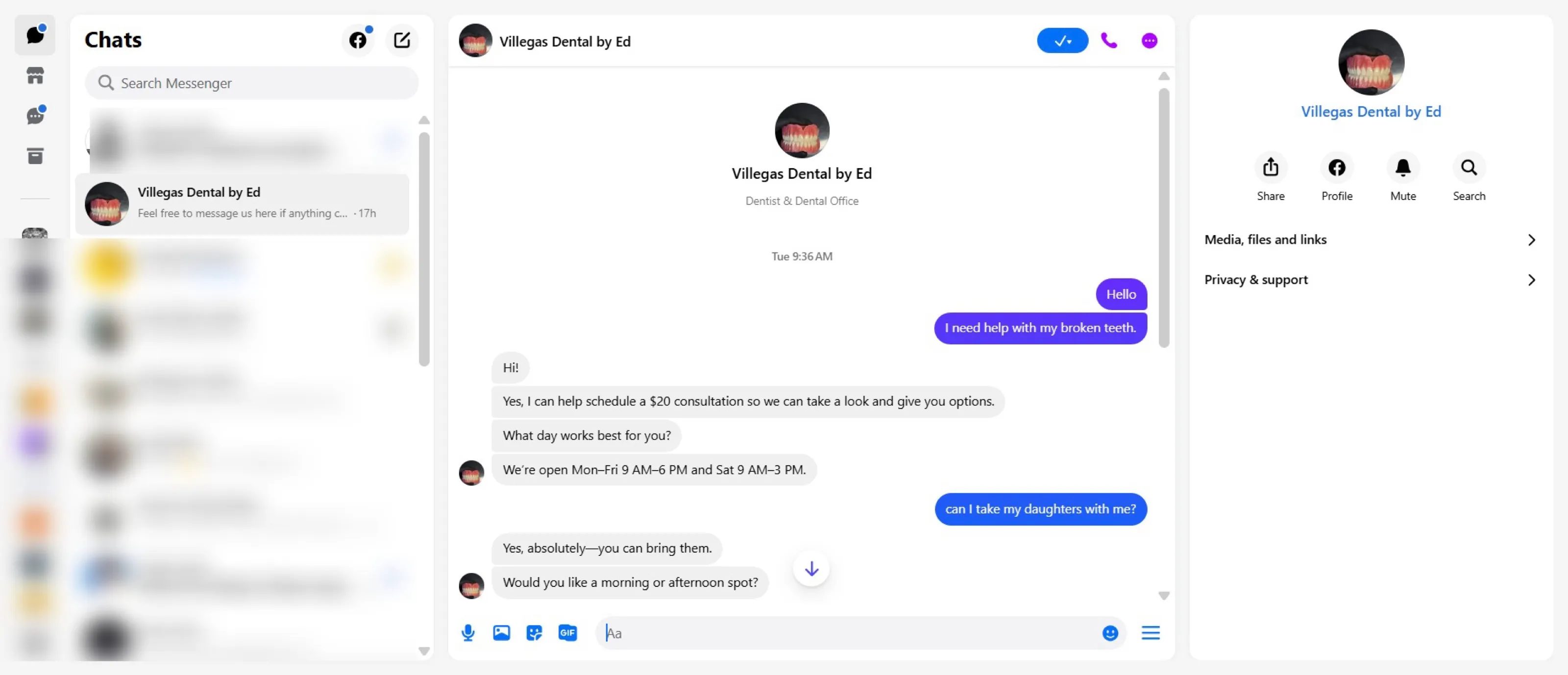
Bookings taken with no staff involvement
An AI chatbot for dental clinics that books appointments on its own: it answers instantly on Messenger, guides the patient through a natural conversation, checks availability and confirms the slot. Bookings sync to Google Calendar and Google Sheets in real time, so patients can book outside clinic hours and the front desk sees everything.
Read case study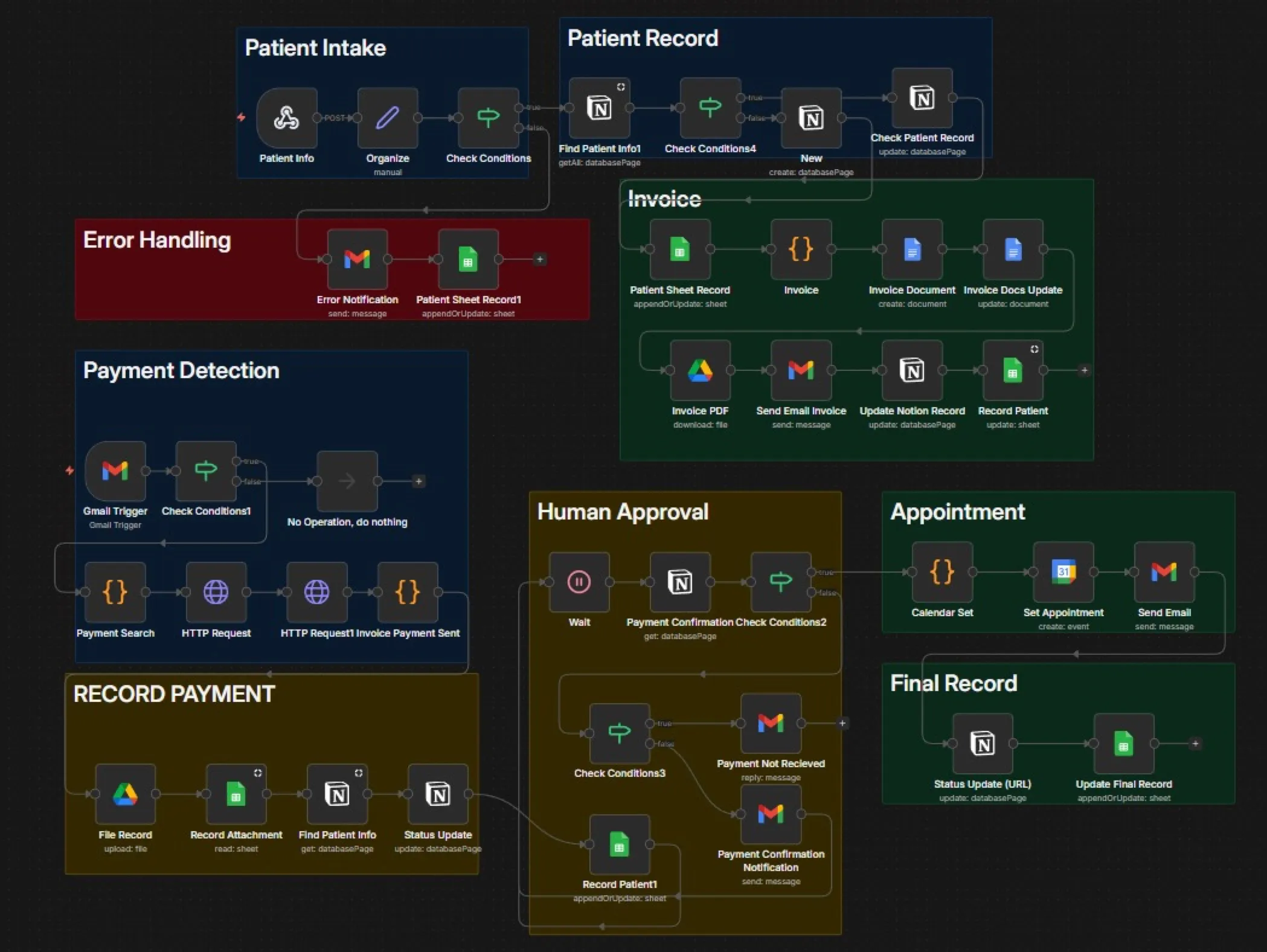
Admin time per patient, with zero manual data entry
A medical clinic handled intake, invoicing, payment tracking and scheduling by hand, with staff switching between four tools per patient. We built an end-to-end n8n automation from intake form to PDF invoice, payment detection in Gmail, calendar booking with a Meet link and live sync to Notion and Sheets. Admin fell by 90%.
Read case study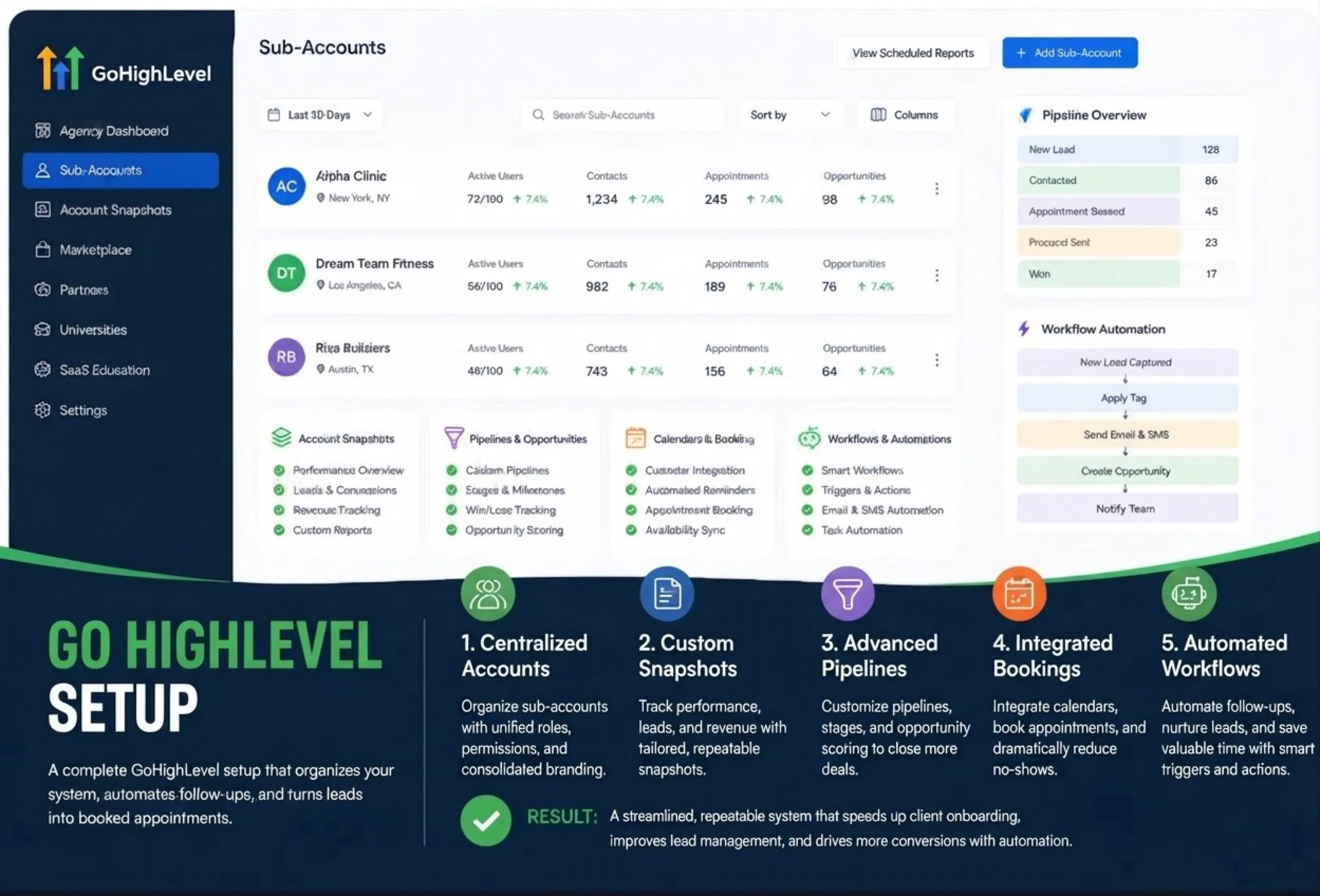
GoHighLevel CRM setup for leads, bookings and team follow-up
- Account structure, sales stages, calendars and contact data organisation
- Automated email and SMS journeys for new leads and booked appointments
- User access, tags, custom fields, task alerts and conversion tracking