
How many form fields is too many?
Shorter forms get more leads and worse ones. Longer forms get fewer and better. Which is right depends on a question most people never ask themselves.
Someone has told you to cut your form to three fields. Someone else has told you that your leads are rubbish and you should ask more questions. Both pieces of advice are correct, and they point in opposite directions, which is why the question is never really “how many fields”.
The honest answer is that there is no field count that avoids the trade-off. There is only a choice about which problem you would rather have.
The trade-off, stated plainly
Every field you remove increases submissions and lowers the average quality of them. Every field you add does the reverse. This is not a design flaw you can engineer around; it is what the fields are for. A field is a small cost you ask the visitor to pay, and the people willing to pay it are, on average, more serious.
So the useful question is: which cost is hurting you more right now, the leads you never got, or the hours your team spends on leads that were never going to buy?
Which bottleneck do you actually have?
Answer these four and the field count decides itself.
- Does your sales team have idle capacity? If they could handle twice the enquiries tomorrow, you are optimising for volume. Cut fields.
- What proportion of enquiries are worth a call? If most of them are, your form is already qualifying well enough. If most are not, you are paying for the shortest form in your market.
- What does a wasted call cost? Thirty minutes of a senior person’s day is a real number. Multiply it by the unqualified enquiries you handled last month. That figure is your budget for adding friction.
- Can you qualify without the form? If you have automation that replies, asks and books within minutes, the form can be short and the qualification can happen after. If follow-up is manual and slow, the form has to do the work.
That last point matters more than any field count. A short form with fast, automated qualification beats a long form every time, because speed of response outweighs almost everything else in lead handling, which is the whole argument in speed to lead.
Which fields genuinely qualify
Only a few questions change what you do next. Those are worth their friction. The rest are admin, and admin can be collected after someone has agreed to talk to you.
| Field | What it tells you | Worth the friction? |
|---|---|---|
| Name | How to address the reply | Yes, one field, first name only |
| Email or phone | How to reach them | Yes, one of them, not both |
| Budget range | Whether you can help at all | Yes, if a minimum genuinely applies |
| Timeline | Whether this is now or next year | Yes, and it sorts your follow-up queue |
| Location or postcode | Whether you serve them | Yes, if you are geographically limited |
| Service or product needed | Which person should reply | Yes, as a short dropdown |
| Company name | Little on its own | Only for B2B, and it can be optional |
| Job title | Whether you are talking to a decision maker | Sometimes, in B2B; rarely elsewhere |
| Company size | Rough deal size in B2B | Only if your pricing depends on it |
| “How did you hear about us?” | Unreliable, and you can measure it properly | No, use hidden fields instead |
| “Tell us about your project” | Varies wildly, often empty | Optional only, never required |
| Full address | Nothing before a sale | No |
| Second phone number, fax, title prefix | Nothing | No |
Two formatting rules that matter as much as the question list. Use ranges rather than free text for budget, because people will not type a number but they will pick a band. And make the long text box optional: the serious buyers fill it in anyway, and the ones who would have abandoned rather than write a paragraph still reach you.
Why multi-step forms often beat both options
For anything above about four fields, splitting the form usually gives you more leads and better data, which is the one way out of the trade-off above.
It works because of where the commitment sits. Step one asks something easy and relevant that the visitor was already thinking about: what do you need, where are you, which service. No contact details, no risk. Once someone has answered that, they have started, and most people finish what they have started. Contact details go on the last step, where the perceived cost is lowest because the end is in sight.
How to build one that works:
- Step one is a single click, not typing. A choice of three to five options.
- Show progress. “Step 1 of 3” or a bar. Hiding the length feels like a trick and people bail when step four appears.
- Qualifying questions in the middle. Budget and timeline belong on step two, not step one.
- Contact details last. Name, then one contact field.
- Never more than three steps for a lead form. Four is a survey.
- Track step completion as separate events. This is the part most people skip, and it is the part that tells you which question is losing you people.
That last point gives you something a single-page form cannot: a drop-off curve. If 40% of people leave on the budget question, you learn that the question is the problem, not the form.
Conditional logic: ask the hard question only when it applies
Conditional logic shows a field based on a previous answer. Used well, it means the average person answers fewer questions while you still get the detail you need from the people it matters for.
Practical uses:
- Show the budget question only when someone picked a service where budget actually disqualifies.
- Ask for a postcode only if they chose an on-site service.
- Replace “tell us about your project” with two specific questions once you know which service they want, because specific questions get answered and open ones do not.
- Skip the company fields entirely when someone selects a consumer option.
Keep one rule: never make a required field appear after the submit button has been pushed. A form that rejects a submission and asks for something new is the fastest way to lose a lead you already had.
Hidden fields, so you can judge quality by channel
A form that captures only what the visitor types is a form you cannot learn from. Add hidden fields, populated automatically, and pass them to your CRM with every submission:
utm_source,utm_medium,utm_campaign,utm_contentandutm_term, read from the URL.- Landing page path, and referrer.
gclidorfbclid, so you can match a closed deal back to a click.- First-touch source, stored in a cookie, as well as last-touch.
- Device type, if your mobile and desktop leads behave differently.
With these in place you can ask the only question that settles the field-count argument: which channel’s leads actually close? A campaign producing twice the leads at half the close rate is not a better campaign, and without hidden fields you cannot see that. It is also where most reporting goes wrong, which GA4 showing the wrong numbers covers in more detail.
Then measure cost per qualified lead rather than cost per submission. If adding two fields cuts submissions by a quarter and raises the close rate by half, you are ahead, and the dashboard that only counts form fills will tell you that you are behind.
What this looks like when we do it
On a form, booking and call tracking setup, the problem was not the form design at all: the client could not tell which enquiries came from where, because GA4 tracks none of it out of the box and booking tools sit in iframes that block tracking. We set up form start and form submit events, phone and email click events and booking clicks in Google Tag Manager, across WordPress, Squarespace, Wix, Calendly and Acuity, then sent the same events to GA4 and the Meta Pixel. After that, campaigns could be judged on booked appointments rather than page views.
Where qualification itself is the bottleneck, the form is sometimes the wrong tool entirely. For a therapy practice, moving qualification into a conversational AI intake flow produced three times the intake completion rate, because a conversation can ask ten questions where a form cannot ask five.
What to change this week
Open your form and count the fields a person must fill in. Then look at last month’s enquiries and count how many were worth a call. If that ratio is good and your team has capacity, remove a field. If the ratio is poor, add one qualifying question and split the form into two steps.
Make one change, not five, and give it four weeks. While you are there, look at the page the form sits on. A form on a page built for browsing is being asked to do a job the page is working against, which is the point of landing page or homepage for your ads.
If you would rather have someone look at the whole path from ad to booked call first, our landing page and CRO work starts with a free audit: a strategist reviews your pages and accounts beforehand, 30 minutes, and you keep the one-page action plan whether you hire us or not.
Common questions
How many fields should a lead form have?
Three to five visible fields is the usual sweet spot for a first contact, and that includes name, contact method and one qualifying question. Go shorter only if your sales team can absorb unqualified enquiries, and longer only if they cannot. Count the fields a person must answer, not the fields on the page.
Do shorter forms always convert better?
Shorter forms submit more often, which is not the same as converting better. If half the extra submissions are people you cannot help, a shorter form has moved your cost per qualified lead in the wrong direction. Measure cost per qualified lead, not cost per form fill.
Are multi-step forms better than single-page forms?
Usually, for anything beyond about four fields. Starting with one easy, low-commitment question gets people into the form, and most who start a step-two form finish it. They also give you partial data on drop-offs, which tells you exactly which question is costing you people.
Should I ask for budget on a lead form?
Ask if budget genuinely disqualifies people, and offer ranges rather than a free-text box. If your minimum engagement is meaningful, a budget range saves both sides a call. If you work with almost any budget, the question only costs you leads and tells you nothing you will act on.
Proof from our work
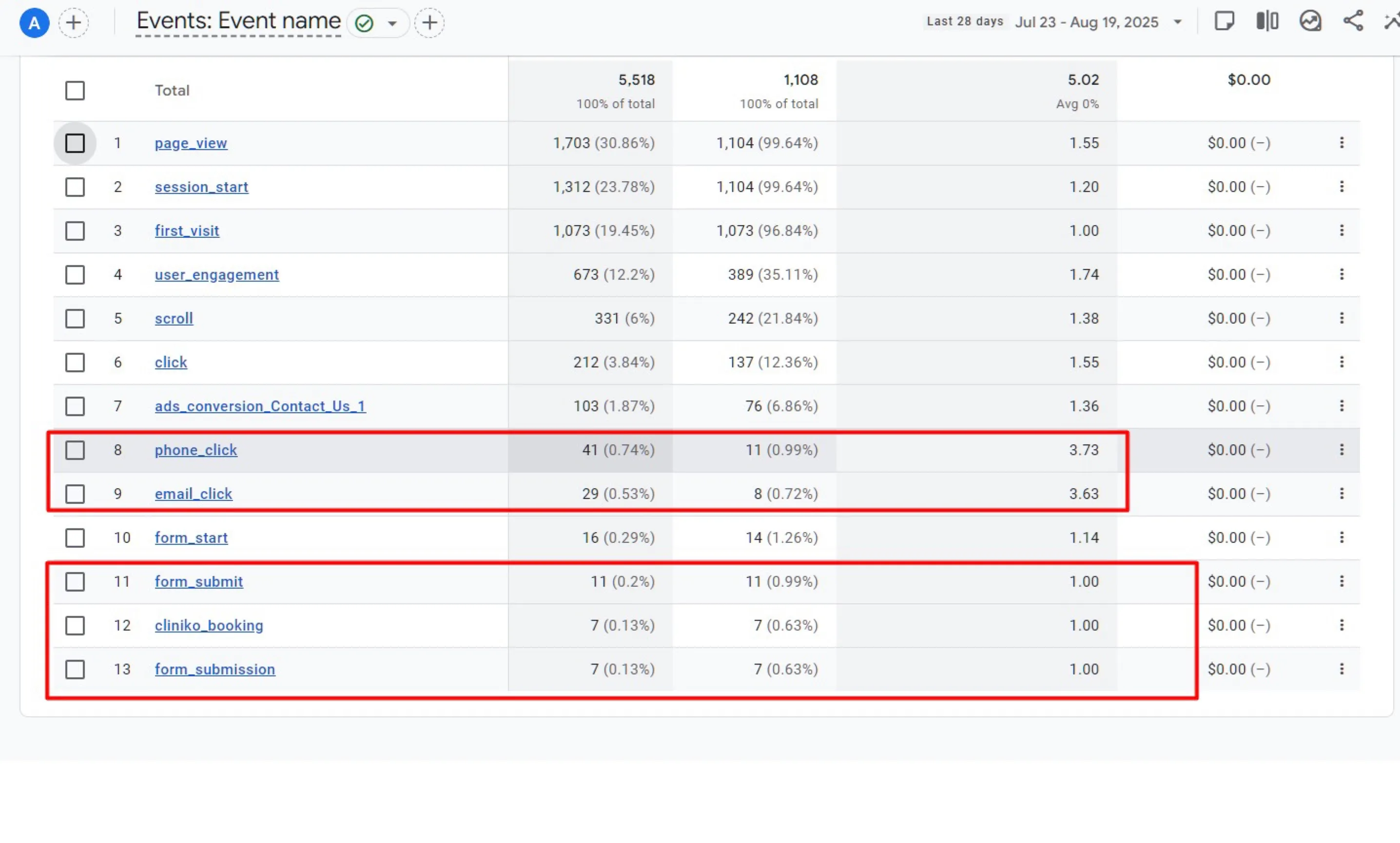
Form, booking and phone-call tracking in Google Tag Manager
- Set up form_start and form_submit events, phone and email click events, and…
- Handled the platform quirks for WordPress, Squarespace and Wix sites, and for Calendly…
- Sent the same events to GA4 and the Meta Pixel so ad platforms could optimise for real…
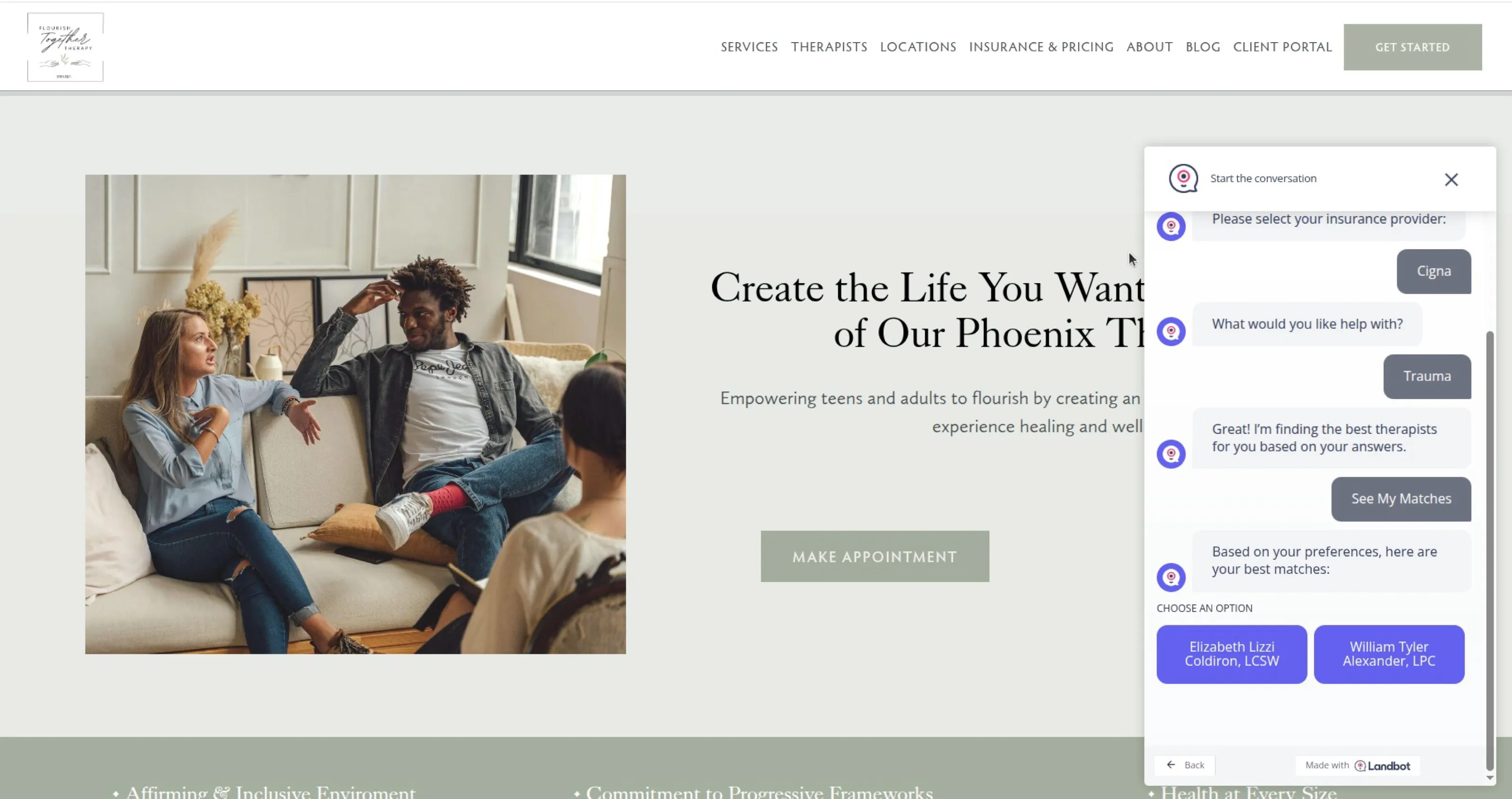
Intake form completion vs the old form
A conversational chatbot for a therapy practice that qualifies prospective clients, matches them to the right therapist, shows insurance options and captures location in a friendly chat flow. Intake completion tripled.
Read case study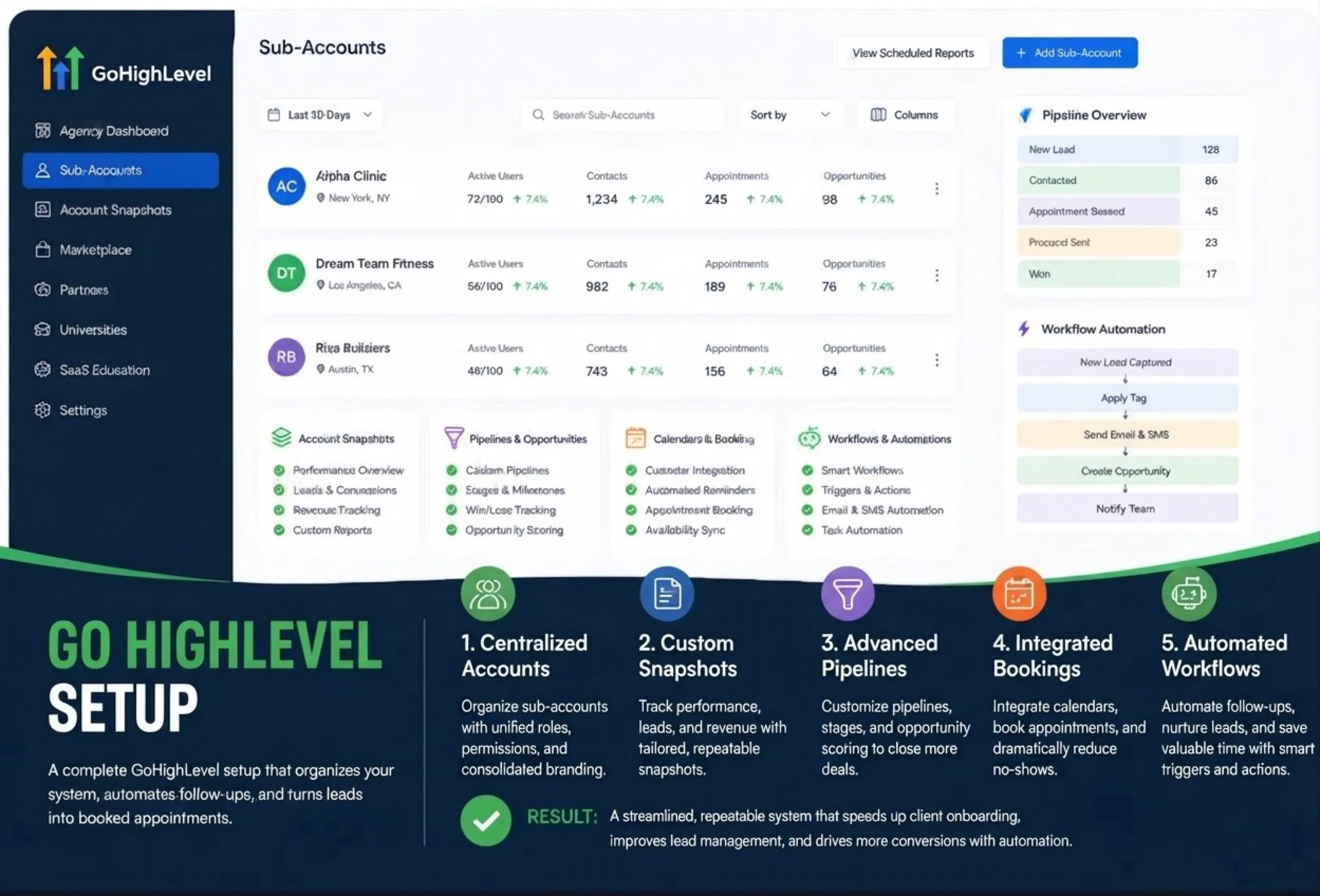
GoHighLevel CRM setup for leads, bookings and team follow-up
- Account structure, sales stages, calendars and contact data organisation
- Automated email and SMS journeys for new leads and booked appointments
- User access, tags, custom fields, task alerts and conversion tracking