
WooCommerce to Shopify without losing your SEO
Migrations lose rankings for one reason: URLs change and nothing tells Google where they went. Here is the inventory, the redirect map and the launch checklist.
The decision to leave WooCommerce is usually easy. Plugin conflicts, a hosting bill that keeps growing, an update that takes the checkout down on a Friday. What stops people is the fear that years of organic traffic will go with it.
That fear is reasonable but the cause is specific. Migrations lose rankings because URLs change and nothing tells Google where they went. Everything below is about closing that gap.
Inventory every URL before you build anything
Do this first, before the design, before the theme, before anyone touches a product import. You cannot redirect what you have not listed.
Pull four lists and combine them in one spreadsheet:
- Search Console. Performance report, Pages tab, last 16 months, export the lot. These are URLs that have actually earned impressions, which makes them the priority list.
- Your XML sitemap. Usually
/sitemap_index.xmlon WooCommerce. This gives you everything the site thinks should be indexed. - A full crawl. Screaming Frog’s free tier covers 500 URLs; use the paid version or Sitebulb above that. A crawl catches orphan pages and URLs no sitemap knows about.
- Your top backlinks. Any link checker will do. A page with external links matters even if it gets no search traffic, because that link equity is worth preserving.
Then add three columns: current URL, monthly clicks, and new URL. The third column stays empty until the Shopify build exists. Sort by clicks, descending. Your top 100 rows are where the risk is concentrated.
While you are in Search Console, note your current average position and total impressions for the last 28 days. That is your baseline, and you will want it in writing when someone asks in week three whether the migration worked.
The URL patterns that change
Shopify does not let you choose your URL structure the way WooCommerce does. The prefixes are fixed, so every URL type changes. Plan for all of them.
| WooCommerce URL | Shopify equivalent | Notes |
|---|---|---|
/product/blue-linen-shirt/ |
/products/blue-linen-shirt |
Handle is usually preserved; the prefix always changes |
/product-category/shirts/ |
/collections/shirts |
Nested categories flatten; /product-category/mens/shirts/ has no nested equivalent |
/shop/ |
/collections/all |
Or a curated collection, which is usually the better landing page |
/product-tag/linen/ |
/collections/linen |
Only if you create the collection; otherwise redirect to the parent collection |
/blog/post-title/ |
/blogs/news/post-title |
Shopify inserts the blog name; news is the default |
/category/journal/ |
/blogs/news/tagged/journal |
Blog category archives become tag views |
/author/sarah/ |
No equivalent | Redirect to the blog index |
/cart/, /checkout/, /my-account/ |
/cart, /checkout, /account |
Shopify handles these; redirect them anyway |
/?s=linen |
/search?q=linen |
Low value, but cheap to map |
/wp-content/uploads/... |
Shopify CDN URL | Redirect only images that earn image search traffic |
Two traps worth naming. First, trailing slashes: WooCommerce typically uses them and Shopify does not, so a redirect rule that ignores this will miss half your URLs. Second, uppercase and query-string variants, such as ?attribute_size=M on variant links. Those need a pattern rule rather than a row each.
Build the redirect map
A redirect map is the spreadsheet above with the third column filled in, and then loaded into Shopify.
Rules we hold to:
- 301, never 302. A temporary redirect does not pass ranking signals the same way.
- One hop. Old URL straight to final URL. Chains dilute and slow things down.
- Closest equivalent, never the home page. Google treats a mass redirect to the home page as a soft 404 and the old page’s signals are lost. If a product is genuinely gone, redirect to its collection. If a category is gone, redirect to the nearest parent.
- Do not redirect to a page that then redirects to HTTPS or to a www variant. Check the final destination resolves with a single 200.
To load them: Shopify admin, Online Store, Navigation, URL Redirects, then Import. The CSV needs two columns, Redirect from and Redirect to, with paths rather than full URLs. Import in batches of a few hundred and spot-check each batch. For pattern-based rules across thousands of URLs, Shopify’s native redirects are literal matches only, so you will either need a bulk redirect app or to generate every row in the spreadsheet.
Test the map before launch. Point your laptop’s hosts file at the Shopify store, or use the preview domain, and run the old URL list through a crawler in list mode. You want zero 404s and zero chains.
What migrates cleanly and what breaks
Be realistic about this up front, because the unpleasant surprises all land in week one.
Migrates cleanly with a tool like Matrixify: products with images and SKUs, collections, customer records, order history, blog posts and pages, basic metafields.
Needs care:
- Variants. WooCommerce allows attribute combinations well beyond Shopify’s variant limits per product. Audit your widest product first. Products that exceed the limits need splitting, or a variant app, and that decision changes your URL map.
- Metadata. SEO titles and descriptions live in Yoast or RankMath custom fields, not in WooCommerce core. Export them deliberately and map them to Shopify’s page title and meta description fields. This gets forgotten constantly, and then rankings drop for reasons nobody can explain.
- Categories to collections. Manual collections import fine. Automated collections need their conditions rebuilding by hand.
Does not migrate:
- Customer passwords. They are hashed and cannot be moved. Every customer resets on first login, so plan the email that tells them why. Say it plainly rather than hoping nobody notices.
- Reviews. They live in a plugin. Export to CSV, import into a Shopify review app, match on SKU.
- Subscriptions. WooCommerce Subscriptions does not transfer. Subscribers must be recreated in a Shopify subscription app, which usually means re-tokenising payment methods and a customer communication plan. Start this four weeks before launch, not four days.
- Plugin-built content. Page-builder layouts, custom post types, booking forms and membership gates all get rebuilt rather than moved.
Metadata and structured data
Redirects preserve equity. Metadata preserves relevance. You need both.
For every page in your top 100, carry across the title tag, meta description, H1 and the body copy. Resist the urge to rewrite copy during the migration. Change the platform, then change the content, so that when something moves you know which one caused it.
Structured data is easier to lose than you would expect, because Yoast was probably generating it for you. On Shopify, check that product pages output Product schema with price, availability and, if you migrated them, aggregate rating. Confirm your breadcrumb markup survived. Then run the key templates through Google’s Rich Results Test before launch, not after.
Also carry over: canonical tags on paginated collections, your robots.txt rules that still apply, and hreflang if you run multiple regions. Shopify’s robots.txt.liquid is editable, which most people do not realise.
Launch day checklist
In order, same day:
- Point DNS to Shopify and confirm the primary domain is set correctly, with one canonical host and HTTPS live.
- Remove the password page. Confirm the store is publicly reachable.
- Check
robots.txtis not blocking the store, and that nonoindextag is left on any template from the staging build. - Submit the new sitemap in Search Console. Do not remove the old property.
- Run the full old-URL list through a crawler in list mode. Fix any 404 or chain immediately.
- Verify tracking fires on a test purchase: GA4 purchase event, ad platform pixels, and one real transaction end to end. If the numbers look wrong in the first week, GA4 showing the wrong numbers is the faster read than guessing.
- Confirm the theme’s page speed is not materially worse than the old site. Migration is exactly when app bloat creeps in, and fixing a slow Shopify store is cheaper to do now than in three months.
- Keep the old site live on a staging subdomain, with
noindexand a password, for 30 days.
The first 30 days in Search Console
Rankings will move. That is normal and not evidence of a mistake. What to watch, weekly:
- Pages report, Not indexed. Rising “Not found (404)” counts mean redirects you missed. This is the single most useful number.
- Crawl stats under Settings. A crawl spike then decline is the expected pattern.
- Impressions, not positions. Total impressions recovering towards your baseline is the real signal. One keyword moving three places is noise.
- Sitemaps. Submitted against indexed. A large gap after three weeks means a technical block, not a patience problem.
Give it two to six weeks before drawing conclusions, and remember that SEO itself works on a three to six month horizon, so a migration that holds flat for a month has done its job. If organic was already underperforming before the move, the migration will not fix that; the structure of your category pages will, and collection page SEO is where that work starts.
What this looks like when we do it
On the Chasin’ Unicorns WooCommerce to Shopify migration, the brief was explicitly not to lose years of content: we moved products, orders, customers and the full blog archive, redesigned the store on Shopify, and set up redirects so existing links kept working. For Hommes & Gardens the job was consolidation rather than replacement, pulling a Squarespace store and a separate Wix site into one Shopify site under a single domain, with redirects and the domain change handled together.
Before you commit
If you have fewer than a few hundred URLs and no subscriptions, this is a job you can run yourself with the lists above and a careful fortnight. If you have thousands of URLs, nested categories, an active subscription base or a decade of blog archive, the redirect map alone is a week of work and getting it wrong is expensive to undo.
Either way, build the URL inventory first. It costs you an afternoon and it tells you which of those two situations you are in. If it turns out to be the second, our e-commerce migration work starts with a free audit of exactly that: what you have, what will change, and what the redirect map actually involves.
Common questions
Will I lose SEO moving from WooCommerce to Shopify?
Not if every old URL redirects with a 301 to its closest equivalent and your metadata moves with it. Rankings normally wobble for two to six weeks while Google recrawls and consolidates signals, then settle. Permanent losses come from missing redirects, thin replacement pages and changed page content, not from the platform itself.
What URL changes when you move to Shopify?
Shopify requires fixed prefixes. Products move to /products/handle, categories become /collections/handle, blog posts move to /blogs/blog-name/handle, and pages move to /pages/handle. WooCommerce tag and author archives have no Shopify equivalent, so those need redirecting to the nearest collection or blog.
Can you migrate WooCommerce reviews to Shopify?
Only with work. Reviews live in your review plugin, not in WooCommerce core, so they export to CSV and then need importing into whichever Shopify review app you choose. Match on SKU rather than product name. Treat it as a separate task with its own budget, because losing review counts does hurt conversion.
How long does a WooCommerce to Shopify migration take?
For a standard catalogue, two to four weeks including design, data migration, redirects and testing. The variables are catalogue complexity, how much plugin functionality needs rebuilding, and how clean the existing data is. SEO recovery runs on its own clock and takes three to six months to show its full effect.
Proof from our work

Chasin' Unicorns: WooCommerce to Shopify migration
- Migrated products, orders, customers and the full blog archive
- Redesigned the store on Shopify with a clean wellness aesthetic
- Set up affiliate products and redirects so existing links kept working

Hommes & Gardens: Wix and Squarespace moved onto Shopify
- Designed and developed a new Shopify site covering both store and portfolio
- Migrated all products and content from Squarespace and Wix
- Consolidated the domain and set up redirects
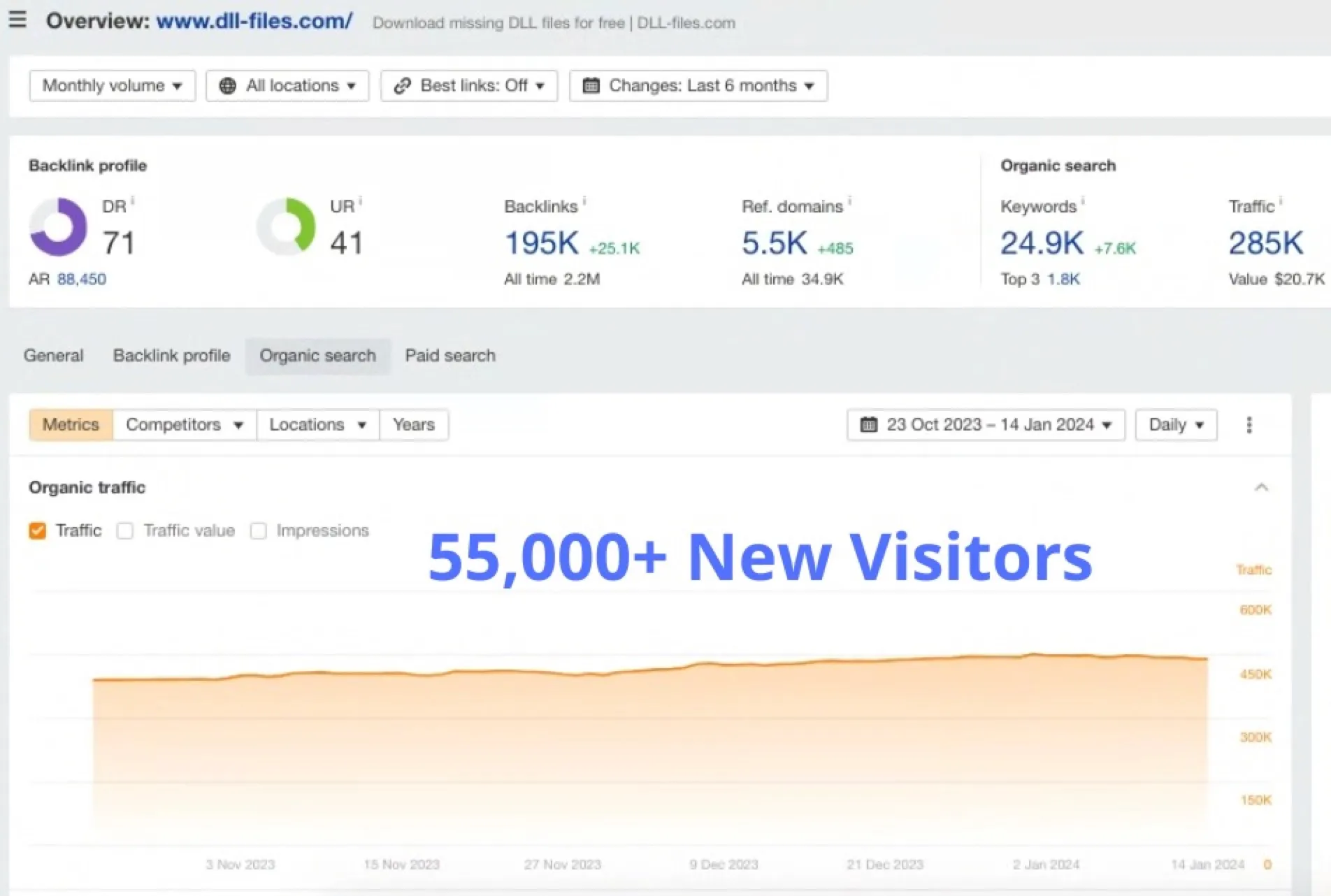
New monthly organic visitors in 12 weeks
A global software download site already had scale. In 12 weeks we added 55,000 monthly organic visitors, 7,600 new keywords and 1,800 new top-3 rankings, pushing monthly organic traffic to 285K with a traffic value of $20.7K.
Read case study