
Meta Pixel vs Conversions API: which one is actually reporting your sales
Your Meta account reports fewer purchases than Shopify does. The browser pixel is losing events it was never able to see, and the Conversions API is how you get them back.
Shopify says you took 180 orders last month. Meta Ads Manager says 112. Nobody changed anything, the pixel is green in Events Manager, and yet a third of your sales have gone missing from the only report your budget decisions depend on.
That gap is not a bug. It is what a browser-only pixel looks like in 2026, and it has a fix with a name.
What the Meta Pixel actually does
The Meta Pixel is a snippet of JavaScript that runs in your visitor’s browser. When somebody views a product or completes a checkout, the pixel assembles an event (ViewContent, AddToCart, Purchase) and posts it to Meta from that device, along with the _fbp browser cookie and, if a click brought them in, the fbclid click ID.
Everything about that chain happens on hardware you do not control. The visitor’s browser decides whether the script loads, whether the cookie is written, and whether the request leaves the device at all. When any link breaks, the event does not arrive late. It never exists.
What the browser pixel alone misses, and why
Four things remove events before Meta sees them, and they stack:
| Cause | What happens | Who it affects |
|---|---|---|
| iOS App Tracking Transparency | A user who declines tracking in the Facebook or Instagram app limits what can be attributed to their click | A large share of iOS traffic, which for most DTC stores is the majority of traffic |
| Safari Intelligent Tracking Prevention | Caps client-side cookie lifetime to 7 days, or 24 hours for links carrying a click ID | Every Safari visitor who buys more than a week after clicking |
| Ad blockers and content blockers | The pixel script is on public block lists, so it never loads | Typically 10–30% of visitors depending on your audience |
| Consent mode and declined banners | The pixel is correctly withheld until consent, and anyone who ignores the banner stays untracked | All EU and UK traffic |
The damage is not evenly spread, which is the real problem. Long consideration cycles, high-ticket products and Safari-heavy audiences lose the most, so the campaigns that look worst in Ads Manager are often the ones selling the expensive items. You then cut the wrong campaign. If your account shows traffic and clicks but the sales never appear in the report, start here rather than with creative, and read our walkthrough of why Meta ads get clicks but no sales once the tracking is sound.
How the Conversions API recovers events server-side
The Conversions API (CAPI) sends the same events from a server instead of a browser. Your Shopify backend, your CRM or a server-side tag container makes an HTTPS POST to Meta’s Graph API with the event name, a timestamp, the value and currency, and a set of hashed customer identifiers.
Nothing in that path touches the visitor’s device after the order is placed, so an ad blocker cannot strip it, ITP cannot expire it and a slow browser cannot drop it. In practice the server knows things the browser never did: the confirmed order value after discounts, whether payment actually captured, and a refund three days later.
Two caveats worth saying out loud. CAPI is not a consent workaround. If somebody declines marketing cookies, you withhold the server event too. And CAPI is not a replacement for the pixel: the browser still contributes the _fbp cookie, the referrer and the fbclid, all of which make matching better. Meta’s guidance, and ours, is to send both.
Deduplication: the part people get wrong
If you send a browser Purchase and a server Purchase for the same order without telling Meta they are the same thing, your ROAS doubles overnight and every decision after that is wrong.
Meta deduplicates on two fields together: the event name and the event ID. Same event_name, same ID, arriving within 48 hours of each other, and Meta keeps one. The field is called eventID in the browser fbq call and event_id in the server payload.
The rule is simple: generate the ID once, server-side, and use it in both places.
- On the order confirmation, generate a stable unique value. The Shopify order ID works, and so does a UUID stored with the order.
- Pass it to the browser pixel:
fbq('track', 'Purchase', {...}, {eventID: '<id>'}). - Send the identical string as
event_idin the CAPI payload. - Set
action_sourcehonestly:websitefor browser events,websitefor server events triggered by a web action,system_generatedfor things like a subscription renewal. - Check it in Events Manager. Test Events shows browser and server arriving as one deduplicated event, and the event’s detail view reports a deduplication rate.
Two mistakes we find in nearly every audit we inherit: a timestamp or random number generated separately in each place, which never matches, and AddToCart deduplicated correctly while Purchase is left alone because it was built later.
Event match quality, and what raises it
Match quality is Meta’s 1-to-10 score for how well it can tie your events to real accounts. A perfectly delivered event with nothing to match on is close to useless, which is why this score matters more than event volume.
Send more identifiers, hashed with SHA-256 before they leave your server:
- Email is the single strongest field. Normalise it first: trim whitespace, lowercase, then hash.
- Phone in E.164 format, country code included, no spaces or brackets.
- First and last name, lowercased.
- City, region, postcode and two-letter country code. Cheap to add and they lift the score noticeably.
- External ID, your own stable customer ID, hashed. Strong for returning buyers.
fbpandfbcread from the browser cookie and passed to the server. Not hashed. Thefbcvalue in particular is close to a direct match when a click brought the visitor in.
Most Shopify stores that only send a hashed email sit around 4 or 5. Adding phone, name and location on purchase events usually moves that into the 7 to 8 range, and you will see the matched conversion count rise with it.
Which setup path, and what you give up
| Path | Good for | The trade-off |
|---|---|---|
| Shopify’s native Meta app | Standard Shopify stores that want CAPI live today | Fixed event set, deduplication handled for you but not inspectable, no custom parameters, nothing for your CRM or offline sales |
| Server-side Google Tag Manager | Stores that also need GA4, enhanced conversions and custom events from one place | A container to host and pay for, real setup and testing time, someone has to understand it afterwards |
| Direct from your backend | Subscriptions, offline conversions, refunds, CRM-driven lead businesses | Needs a developer, and hashing, retries and payload validation are yours to maintain |
| A third-party app or connector | Non-Shopify platforms with a ready integration | You inherit their event schema and their bugs, and the data path runs through another company |
For most stores we build server-side GTM, because one container feeds Meta, GA4 and Google Ads from a single clean data layer, which is also how you stop GA4 and Ads disagreeing about the same month. Where a store is small, early and on Shopify, the native app is the right answer and we say so.
What “good” looks like
Check these in Events Manager rather than trusting a green dot:
- Each key event shows both browser and server as a source, with a deduplication rate reported and no obvious double counting.
- Meta’s
Purchasecount for last month sits within roughly 10% of your store’s own order count. - Event match quality on
Purchaseis 6 or higher, and you know which fields you are sending. - Total events are visibly higher than they were with the pixel alone.
- Test Events shows a real end-to-end purchase arriving once, with value and currency correct.
- No “missing parameter” or “unverified domain” warnings sitting unread in the diagnostics tab.
What this looks like when we do it
For a fashion store whose pixel was seeing only part of its purchases, we deployed a server-side GTM container, routed GA4 and Meta events through it, implemented CAPI with deduplication and switched on advanced matching. Events Manager reported double the events compared with the pixel alone, with 52% of purchase events carrying advanced matching data. The full build is written up in the server-side CAPI and GTM case study, including how each event was verified in Test Events and GA4 DebugView before launch.
Where to start
Open Events Manager, look at your Purchase event, and answer two questions: is there a server source listed, and what is the match quality score? If the answer is “no” and “4”, you are optimising campaigns on a fraction of your sales, and no creative test will fix that. If your store is getting traffic that never converts in the reports at all, the same diagnosis applies to Shopify traffic that is not turning into sales.
Fixing it is a defined piece of work, not an ongoing experiment. See how we handle tracking and analytics, or book a free audit and a strategist will go through your Events Manager before the call and leave you a one-page action plan either way.
Common questions
Do I need the Meta Pixel if I have the Conversions API?
Yes, run both. The pixel captures browser signals and page context the server does not see, and the Conversions API captures events the browser loses. Meta's own guidance is to send both and deduplicate them with a shared event_id, which gives better coverage than either source alone.
Will the Conversions API double count my purchases?
Only if you set it up without deduplication. Meta matches a browser event to a server event when the event name and the event_id are identical and they arrive within 48 hours. Send the same generated ID from both sources and Meta keeps one. Omit it and every sale is counted twice.
What is a good event match quality score?
Meta scores match quality from 1 to 10 in Events Manager. Below 4 is poor and worth fixing immediately. Between 5 and 7 is normal for most stores. Above 8 usually means you are sending hashed email, phone, first and last name, city, region and country on purchase events.
How long does a Conversions API setup take?
On Shopify with the native Meta app it is an afternoon. A server-side Google Tag Manager container with GA4 and Meta events routed through it, tested and deduplicated, is normally a one to two week piece of work. We get tracking live within 14 days before touching campaigns.
Does the Conversions API get around consent requirements?
No, and it should not be used that way. If a visitor declines marketing consent you must not send their event from the server either. Server-side tracking recovers events from people who did consent but whose browser blocked the pixel. That is a technical gap, not a legal one.
Proof from our work
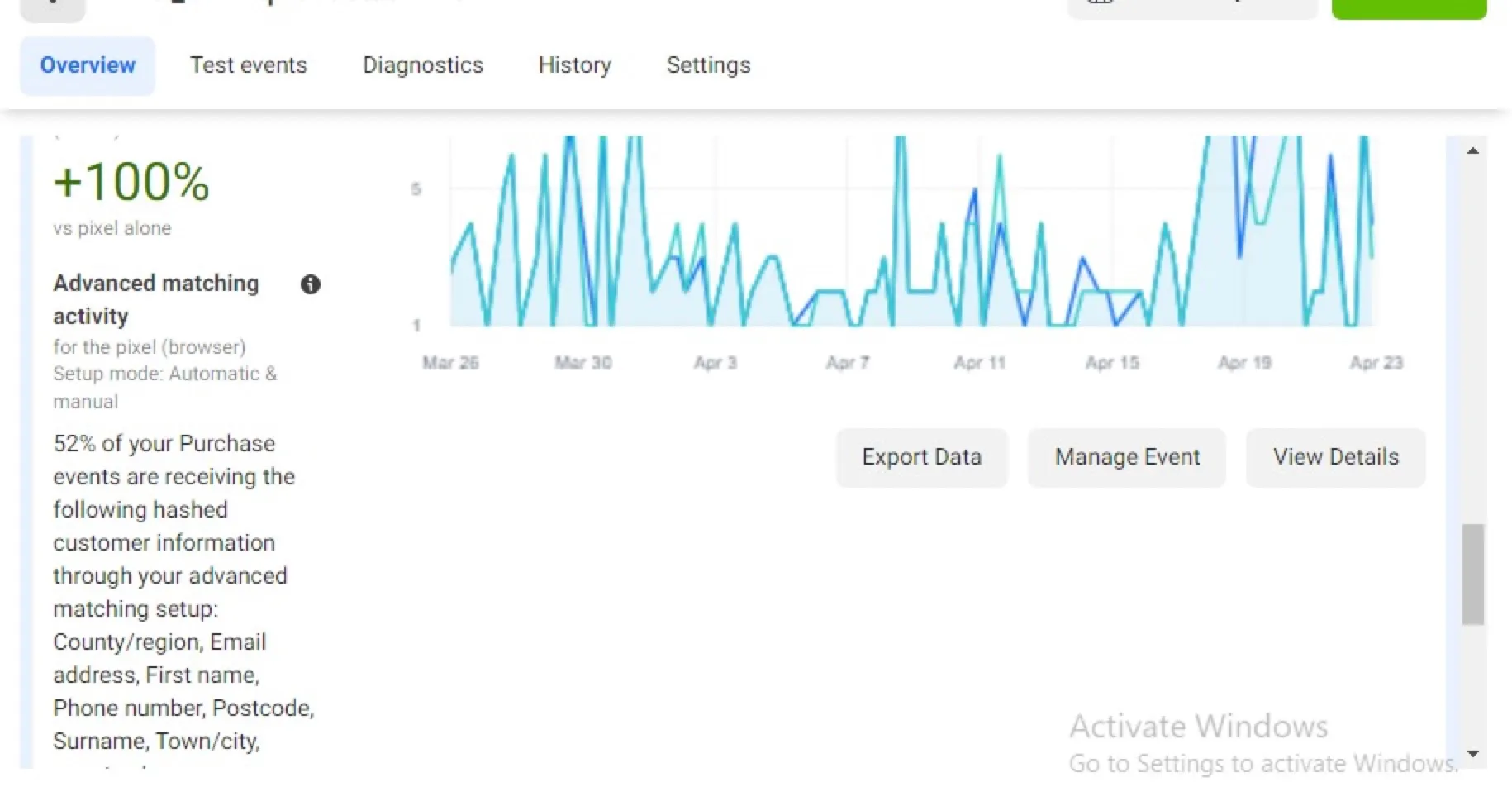
Meta Conversions API and GA4 server-side tracking via GTM
- Deployed a server-side Google Tag Manager container and routed GA4 and Meta events…
- Implemented the Meta Conversions API with event deduplication so browser and server…
- Enabled advanced matching so hashed customer data (email, phone, name, location)…
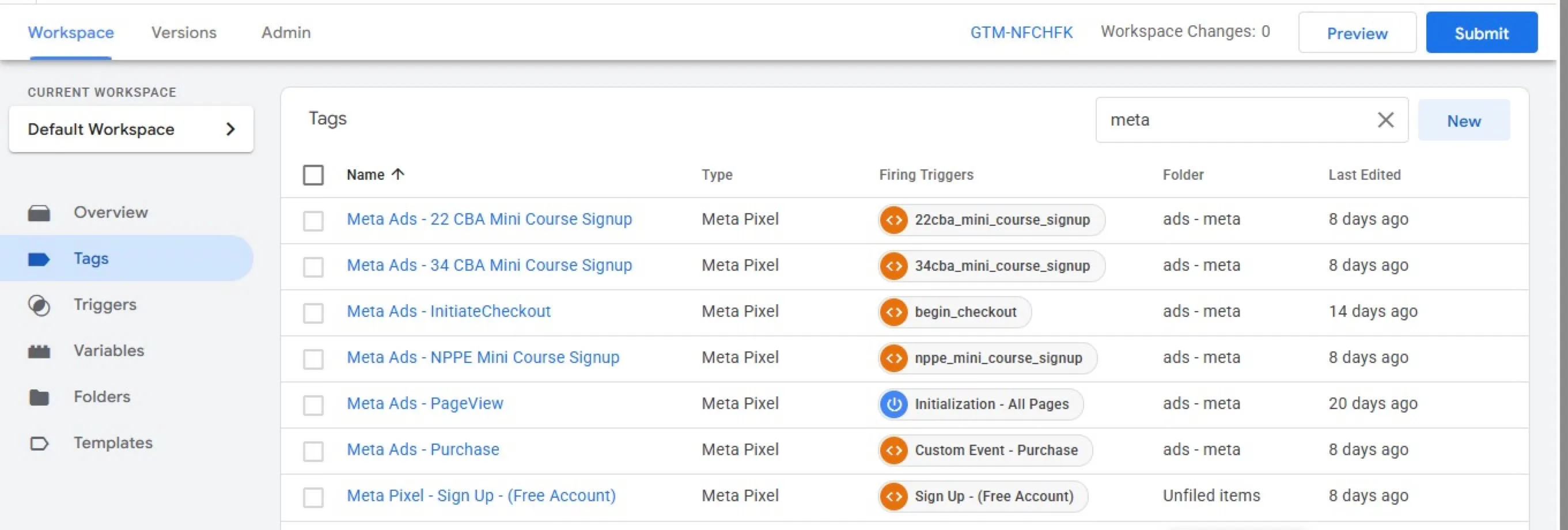
GA4, Tag Manager and Meta Pixel set up for a membership site
- Implemented GA4, Google Tag Manager, Google Ads and the Meta Pixel from one container…
- Fixed revenue tracking in GA4 and the Pixel and configured Google Ads conversions for…
- Investigated duplicate Meta Purchase events and identified a separate Conversions API…
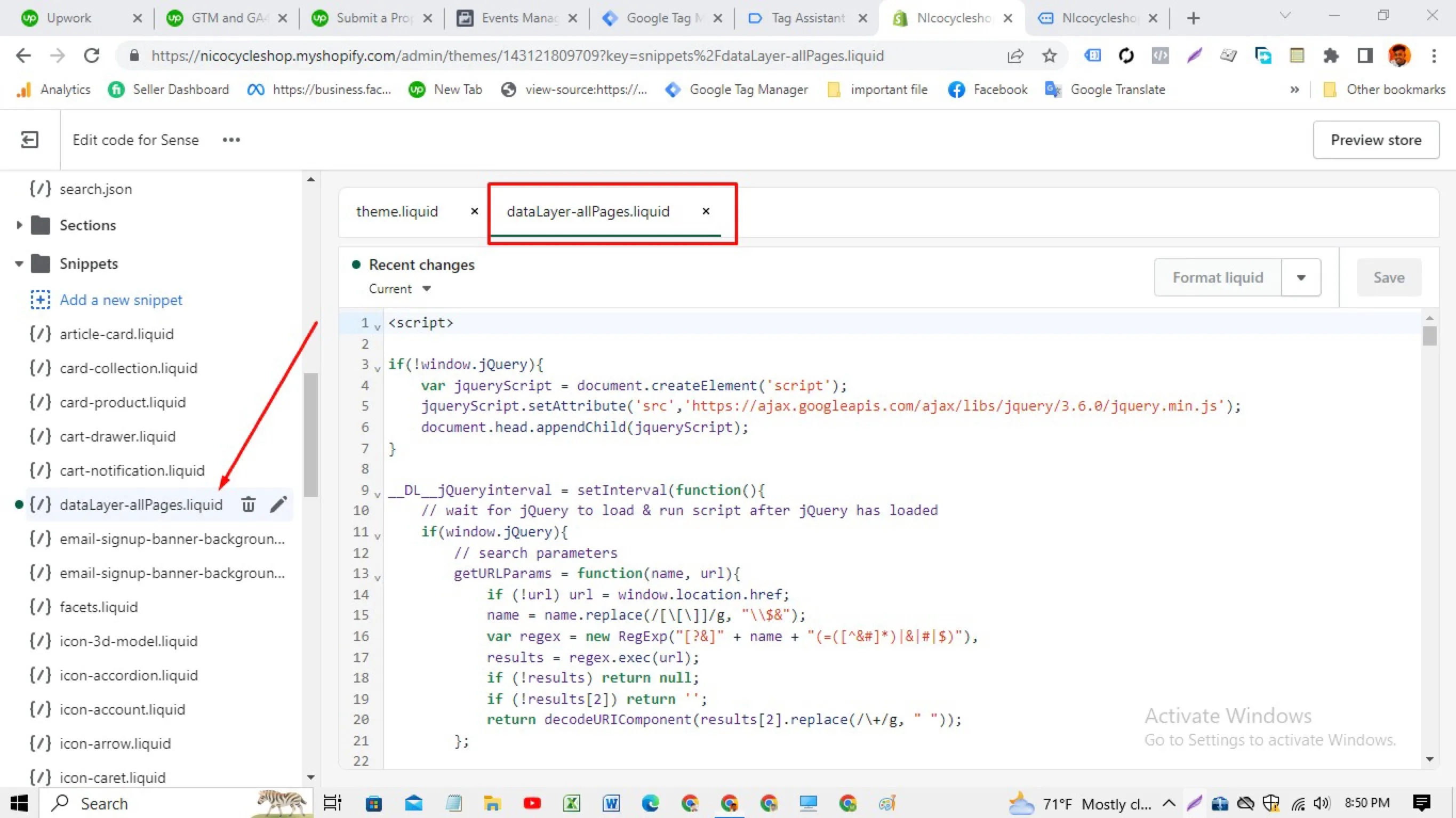
Shopify data layer built in the theme, with no tracking apps
- Wrote a data layer snippet in the theme's Liquid files that outputs product,…
- Loaded Google Tag Manager from the theme and built the GA4, Google Ads and Meta tags…
- Verified with Google's Tag Assistant that the container and events fire on each template